文章作者:jqpeng
原文链接: APM 原理与框架选型

发些存稿:)

0. APM简介

随着微服务架构的流行,一次请求往往需要涉及到多个服务,因此服务性能监控和排查就变得更复杂:

  • 不同的服务可能由不同的团队开发、甚至可能使用不同的编程语言来实现
  • 服务有可能布在了几千台服务器,横跨多个不同的数据中心

因此,就需要一些可以帮助理解系统行为、用于分析性能问题的工具,以便发生故障的时候,能够快速定位和解决问题,这就是APM系统,全称是(Application Performance Monitor,当然也有叫 Application Performance Management tools)

AMP最早是谷歌公开的论文提到的 Google Dapper。Dapper是Google生产环境下的分布式跟踪系统,自从Dapper发展成为一流的监控系统之后,给google的开发者和运维团队帮了大忙,所以谷歌公开论文分享了Dapper。

1. 谷歌Dapper介绍

1.1 Dapper的挑战

在google的首页页面,提交一个查询请求后,会经历什么:

  • 可能对上百台查询服务器发起了一个Web查询,每一个查询都有自己的Index
  • 这个查询可能会被发送到多个的子系统,这些子系统分别用来处理广告、进行拼写检查或是查找一些像图片、视频或新闻这样的特殊结果
  • 根据每个子系统的查询结果进行筛选,得到最终结果,最后汇总到页面上

总结一下:

  • 一次全局搜索有可能调用上千台服务器,涉及各种服务。
  • 用户对搜索的耗时是很敏感的,而任何一个子系统的低效都导致导致最终的搜索耗时

如果一次查询耗时不正常,工程师怎么来排查到底是由哪个服务调用造成的?

  • 首先,这个工程师可能无法准确的定位到这次全局搜索是调用了哪些服务,因为新的服务、乃至服务上的某个片段,都有可能在任何时间上过线或修改过,有可能是面向用户功能,也有可能是一些例如针对性能或安全认证方面的功能改进
  • 其次,你不能苛求这个工程师对所有参与这次全局搜索的服务都了如指掌,每一个服务都有可能是由不同的团队开发或维护的
  • 再次,这些暴露出来的服务或服务器有可能同时还被其他客户端使用着,所以这次全局搜索的性能问题甚至有可能是由其他应用造成的

从上面可以看出Dapper需要:

  • 无所不在的部署,无所不在的重要性不言而喻,因为在使用跟踪系统的进行监控时,即便只有一小部分没被监控到,那么人们对这个系统是不是值得信任都会产生巨大的质疑
  • 持续的监控

1.2 Dapper的三个具体设计目标

  1. 性能消耗低
    APM组件服务的影响应该做到足够小。服务调用埋点本身会带来性能损耗,这就需要调用跟踪的低损耗,实际中还会通过配置采样率的方式,选择一部分请求去分析请求路径。在一些高度优化过的服务,即使一点点损耗也会很容易察觉到,而且有可能迫使在线服务的部署团队不得不将跟踪系统关停。
  2. 应用透明,也就是代码的侵入性小
    即也作为业务组件,应当尽可能少入侵或者无入侵其他业务系统,对于使用方透明,减少开发人员的负担。
    对于应用的程序员来说,是不需要知道有跟踪系统这回事的。如果一个跟踪系统想生效,就必须需要依赖应用的开发者主动配合,那么这个跟踪系统也太脆弱了,往往由于跟踪系统在应用中植入代码的bug或疏忽导致应用出问题,这样才是无法满足对跟踪系统“无所不在的部署”这个需求。
  3. 可扩展性
    一个优秀的调用跟踪系统必须支持分布式部署,具备良好的可扩展性。能够支持的组件越多当然越好。或者提供便捷的插件开发API,对于一些没有监控到的组件,应用开发者也可以自行扩展。
  4. 数据的分析
    数据的分析要快 ,分析的维度尽可能多。跟踪系统能提供足够快的信息反馈,就可以对生产环境下的异常状况做出快速反应。分析的全面,能够避免二次开发。

1.3 Dapper的分布式跟踪原理

先来看一次请求调用示例:

  1. 包括:前端(A),两个中间层(B和C),以及两个后端(D和E)
  2. 当用户发起一个请求时,首先到达前端A服务,然后分别对B服务和C服务进行RPC调用;
  3. B服务处理完给A做出响应,但是C服务还需要和后端的D服务和E服务交互之后再返还给A服务,最后由A服务来响应用户的请求;

Dapper的分布式跟踪

Dapper是如何来跟踪记录这次请求呢?

1.3.1 跟踪树和span

Span是dapper的基本工作单元,一次链路调用(可以是RPC,DB等没有特定的限制)创建一个span,通过一个64位ID标识它;同时附加(Annotation)作为payload负载信息,用于记录性能等数据。

5个span在Dapper跟踪树种短暂的关联关系

上图说明了span在一次大的跟踪过程中是什么样的。Dapper记录了span名称,以及每个span的ID和父ID,以重建在一次追踪过程中不同span之间的关系。如果一个span没有父ID被称为root span。所有span都挂在一个特定的跟踪上,也共用一个跟踪id。

再来看下Span的细节:

一个单独的span的细节图

Span数据结构:

type Span struct {
    TraceID    int64 // 用于标示一次完整的请求id
    Name       string
    ID         int64 // 当前这次调用span_id
    ParentID   int64 // 上层服务的调用span_id  最上层服务parent_id为null
    Annotation []Annotation // 用于标记的时间戳
    Debug      bool
}

1.3.2 TraceID

类似于 树结构的Span集合,表示一次完整的跟踪,从请求到服务器开始,服务器返回response结束,跟踪每次rpc调用的耗时,存在唯一标识trace_id。比如:你运行的分布式大数据存储一次Trace就由你的一次请求组成。

Trace

每种颜色的note标注了一个span,一条链路通过TraceId唯一标识,Span标识发起的请求信息。树节点是整个架构的基本单元,而每一个节点又是对span的引用。节点之间的连线表示的span和它的父span直接的关系。虽然span在日志文件中只是简单的代表span的开始和结束时间,他们在整个树形结构中却是相对独立的。

1.3.3 Annotation

Dapper允许应用程序开发人员在Dapper跟踪的过程中添加额外的信息,以监控更高级别的系统行为,或帮助调试问题。这就是Annotation:

Annotation,用来记录请求特定事件相关信息(例如时间),一个span中会有多个annotation注解描述。通常包含四个注解信息:

(1) cs:Client Start,表示客户端发起请求
(2) sr:Server Receive,表示服务端收到请求
(3) ss:Server Send,表示服务端完成处理,并将结果发送给客户端
(4) cr:Client Received,表示客户端获取到服务端返回信息

Annotation数据结构:

type Annotation struct {
    Timestamp int64
    Value     string
    Host      Endpoint
    Duration  int32
}

1.3.4 采样率

低损耗的是Dapper的一个关键的设计目标,因为如果这个工具价值未被证实但又对性能有影响的话,你可以理解服务运营人员为什么不愿意部署它。

另外,某些类型的Web服务对植入带来的性能损耗确实非常敏感。

因此,除了把Dapper的收集工作对基本组件的性能损耗限制的尽可能小之外,Dapper支持设置采样率来减少性能损耗,同时支持可变采样。

2. APM组件选型

市面上的全链路监控理论模型大多都是借鉴Google Dapper论文,重点关注以下三种APM组件:

  1. **Zipkin**:由Twitter公司开源,开放源代码分布式的跟踪系统,用于收集服务的定时数据,以解决微服务架构中的延迟问题,包括:数据的收集、存储、查找和展现。
  2. **Pinpoint**:一款对Java编写的大规模分布式系统的APM工具,由韩国人开源的分布式跟踪组件。
  3. **Skywalking**:国产的优秀APM组件,是一个对JAVA分布式应用程序集群的业务运行情况进行追踪、告警和分析的系统。

2.1 对比项

主要对比项:

  1. 探针的性能
    主要是agent对服务的吞吐量、CPU和内存的影响。微服务的规模和动态性使得数据收集的成本大幅度提高。
  2. collector的可扩展性
    能够水平扩展以便支持大规模服务器集群。
  3. 全面的调用链路数据分析
    提供代码级别的可见性以便轻松定位失败点和瓶颈。
  4. 对于开发透明,容易开关
    添加新功能而无需修改代码,容易启用或者禁用。
  5. 完整的调用链应用拓扑
    自动检测应用拓扑,帮助你搞清楚应用的架构

2.2 探针的性能

比较关注探针的性能,毕竟APM定位还是工具,如果启用了链路监控组建后,直接导致吞吐量降低过半,那也是不能接受的。对skywalking、zipkin、pinpoint进行了压测,并与基线(未使用探针)的情况进行了对比。

选用了一个常见的基于Spring的应用程序,他包含Spring Boot, Spring MVC,redis客户端,mysql。 监控这个应用程序,每个trace,探针会抓取5个span(1 Tomcat, 1 SpringMVC, 2 Jedis, 1 Mysql)。这边基本和 skywalkingtest 的测试应用差不多。

模拟了三种并发用户:500,750,1000。使用jmeter测试,每个线程发送30个请求,设置思考时间为10ms。使用的采样率为1,即100%,这边与生产可能有差别。pinpoint默认的采样率为20,即50%,通过设置agent的配置文件改为100%。zipkin默认也是1。组合起来,一共有12种。下面看下汇总表:

探针性能

从上表可以看出,在三种链路监控组件中,skywalking的探针对吞吐量的影响最小,zipkin的吞吐量居中。pinpoint的探针对吞吐量的影响较为明显,在500并发用户时,测试服务的吞吐量从1385降低到774,影响很大。然后再看下CPU和memory的影响,在内部服务器进行的压测,对CPU和memory的影响都差不多在10%之内。

2.3 collector的可扩展性

collector的可扩展性,使得能够水平扩展以便支持大规模服务器集群。

  1. zipkin
    开发zipkin-Server(其实就是提供的开箱即用包),zipkin-agent与zipkin-Server通过http或者mq进行通信,http通信会对正常的访问造成影响,所以还是推荐基于mq异步方式通信,zipkin-Server通过订阅具体的topic进行消费。这个当然是可以扩展的,多个zipkin-Server实例进行异步消费mq中的监控信息。
  2. skywalking
    skywalking的collector支持两种部署方式:单机和集群模式。collector与agent之间的通信使用了gRPC。
  3. pinpoint
    同样,pinpoint也是支持集群和单机部署的。pinpoint agent通过thrift通信框架,发送链路信息到collector。

2.4 全面的调用链路数据分析

全面的调用链路数据分析,提供代码级别的可见性以便轻松定位失败点和瓶颈。

zipkin

zipkin
zipkin的链路监控粒度相对没有那么细,从上图可以看到调用链中具体到接口级别,再进一步的调用信息并未涉及。

skywalking

skywalking

**skywalking 还支持20+的中间件、框架、类库**,比如:主流的dubbo、Okhttp,还有DB和消息中间件。上图skywalking链路调用分析截取的比较简单,网关调用user服务,**由于支持众多的中间件,所以skywalking链路调用分析比zipkin完备些**。

pinpoint

pinpoint
pinpoint应该是这三种APM组件中,数据分析最为完备的组件。提供代码级别的可见性以便轻松定位失败点和瓶颈,上图可以看到对于执行的sql语句,都进行了记录。还可以配置报警规则等,设置每个应用对应的负责人,根据配置的规则报警,支持的中间件和框架也比较完备。

2.5 对于开发透明,容易开关

对于开发透明,容易开关,添加新功能而无需修改代码,容易启用或者禁用。我们期望功能可以不修改代码就工作并希望得到代码级别的可见性。

对于这一点,Zipkin 使用修改过的类库和它自己的容器(Finagle)来提供分布式事务跟踪的功能。但是,它要求在需要时修改代码。skywalking和pinpoint都是基于字节码增强的方式,开发人员不需要修改代码,并且可以收集到更多精确的数据因为有字节码中的更多信息。

2.6 完整的调用链应用拓扑

自动检测应用拓扑,帮助你搞清楚应用的架构。

zipkin链路拓扑:
zipkin链路拓扑

skywalking链路拓扑:

skywalking链路拓扑

pinpoint

三个组件都能实现完整的调用链应用拓扑。相对来说:

  • pinpoint界面显示的更加丰富,具体到调用的DB名
  • zipkin的拓扑局限于服务于服务之间

2.7 社区支持

Zipkin 由 Twitter 开发,可以算得上是明星团队,而 pinpoint的Naver 的团队只是一个默默无闻的小团队,skywalking是国内的明星项目,目前属于apache孵化项目,社区活跃。

2.8 总结

zipkin pinpoint skywalking
探针性能 中 低 高
collector扩展性 高 中 高
调用链路数据分析 低 高 中
对开发透明性 中 高 高
调用链应用拓扑 中 高 中
社区支持 高 中 高

相对来说,skywalking更占优,因此团队采用skywalking作为APM工具。

3. 参考内容

本文主要内容参考下文:
https://juejin.im/post/5a7a9e0af265da4e914b46f1
http://bigbully.github.io/Dapper-translation/

文章作者:jqpeng
原文链接: 统一配置中心选型对比

整理笔记时发现之前整理的一些东西,分享给大家。

为什么需要集中配置

程序的发展,需要引入集中配置:

  • 随着程序功能的日益复杂,程序的配置日益增多:各种功能的开关、参数的配置、服务器的地址……
  • 并且对配置的期望也越来越高,配置修改后实时生效,灰度发布,分环境、分集群管理配置,完善的权限、审核机制……
  • 并且随着采用分布式的开发模式,项目之间的相互引用随着服务的不断增多,相互之间的调用复杂度成指数升高,每次投产或者上线新的项目时苦不堪言,因此需要引用配置中心治理。

已有zookeeper、etcd还需要引入吗?

  • 之前的音乐服务项目,通过etcd实现了服务的注册与发现,且一些业务配置也存储到etcd中,通过实践我们收获了集中配置带来的优势
  • 但是etcd并没有方便的UI管理工具,且缺乏权限、审核等机制
  • 最重要的是,etcd和zookeeper通常定义为服务注册中心,统一配置中心的事情交给专业的工具去解决。

有哪些开源配置中心

  1. spring-cloud/spring-cloud-config
    https://github.com/spring-cloud/spring-cloud-config
    spring出品,可以和spring cloud无缝配合
  2. 淘宝 diamond
    https://github.com/takeseem/diamond
    已经不维护
  3. disconf
    https://github.com/knightliao/disconf
    java开发,蚂蚁金服技术专家发起,业界使用广泛
  4. ctrip apollo
    https://github.com/ctripcorp/apollo/
    Apollo(阿波罗)是携程框架部门研发的开源配置管理中心,具备规范的权限、流程治理等特性。

配置中心对别

功能特性

我们先从功能层面来对别

功能点 优先级 spring-cloud-config ctrip apollo disconf 备注
静态配置管理 高 基于file 支持 支持
动态配置管理 高 支持 支持 支持
统一管理 高 无,需要github 支持 支持
多环境 中 无,需要github 支持 支持
本地配置缓存 高 无 支持 支持
配置锁 中 支持 不支持 不支持 不允许动态及远程更新
配置校验 中 无 无 无 如:ip地址校验,配置
配置生效时间 重启生效,或手动refresh生效 实时 实时 需要结合热加载管理, springcloudconfig需要 git webhook+rabbitmq 实时生效
配置更新推送 高 需要手工触发 支持 支持
配置定时拉取 高 无 支持 配置更新目前依赖事件驱动, client重启或者server端推送操作
用户权限管理 中 无,需要github 支持 支持 现阶段可以人工处理
授权、审核、审计 中 无,需要github 支持 无 现阶段可以人工处理
配置版本管理 高 Git做版本管理 界面上直接提供发布历史和回滚按钮 操作记录有落数据库,但无查询接口
配置合规检测 高 不支持 支持(但还需完善)
实例配置监控 高 需要结合springadmin 支持 支持,可以查看每个配置在哪些机器上加载
灰度发布 中 不支持 支持 不支持部分更新 现阶段可以人工处理
告警通知 中 不支持 支持,邮件方式告警 支持,邮件方式告警
依赖关系 高 不支持 不支持 不支持 配置与系统版本的依赖系统运行时的依赖关系

技术路线兼容性

引入配置中心,需要考虑和现有项目的兼容性,以及是否引入额外的第三方组件。我们的java项目以SpringBoot为主,需要重点关注springboot支持性。

功能点 优先级 spring-cloud-config ctrip apollo disconf 备注
SpringBoot支持 高 原生支持 支持 与spring boot无相关
SpringCloud支持 高 原生支持 支持 与spring cloud无相关
客户端支持 低 Java Java、.Net java
业务系统侵入性 高 侵入性弱 侵入性弱 侵入性弱,支持注解及xml方式
依赖组件 高 Eureka Eureka zookeeper

可用性与易用性

引入配置中心后,所有的应用都需要依赖配置中心,因此可用性需要重点关注,另外管理的易用性也需要关注。

功能点 优先级 spring-cloud-config ctrip apollo disconf 备注
单点故障(SPOF) 高 支持HA部署 支持HA部署 支持HA部署,高可用由zookeeper保证
多数据中心部署 高 支持 支持 支持
配置获取性能 高 unkown unkown(官方说比spring快)
配置界面 中 无,需要通过git操作 统一界面(ng编写) 统一界面

最终选择

综上,ctrip applo是较好的选择方案,最终选择applo。

  • 支持不同环境(开发、测试、生产)、不同集群
  • 完善的管理系统,权限管理、发布审核、操作审计
  • SpringBoot集成友好 ,较小的迁移成本
  • 配置修改实时生效(热发布)
  • 版本发布管理

部署情况

  • 管理Web:http://config.***.com/
  • 三个环境MetaServer:
    • Dev: config.devmeta.***.com
    • Test: config.testmeta.***.com
    • PRO: config.prometa.***.com

文章作者:jqpeng
原文链接: Spring boot国际化

国际化主要是引入了MessageSource,我们简单看下如何使用,以及其原理。

1.1 设置资源文件

在 properties新建i18n目录

新建message文件:

messages.properties

error.title=Your request cannot be processed

messages_zh_CN.properties

error.title=您的请求无法处理

1.2 配置

修改properties文件的目录:在application.yml或者application.properties中配置 spring.message.basename

spring:
    application:
        name: test-worklog
    messages:
        basename: i18n/messages
        encoding: UTF-8

1.3 使用

引用自动注解的MessageSource,调用messageSource.getMessage即可,注意,需要通过 LocaleContextHolder.getLocale()获取当前的地区。

@Autowired
private MessageSource messageSource;
/**
 * 国际化
 *
 * @param result
 * @return
 */
public String getMessage(String result, Object[] params) {
    String message = "";
    try {
        Locale locale = LocaleContextHolder.getLocale();
        message = messageSource.getMessage(result, params, locale);
    } catch (Exception e) {
        LOGGER.error("parse message error! ", e);
    }
    return message;
}

如何设置个性化的地区呢? forLanguageTag 即可

 Locale locale = Locale.forLanguageTag(user.getLangKey());

1.4 原理分析

MessageSourceAutoConfiguration中,实现了autoconfig

@Configuration
@ConditionalOnMissingBean(value = MessageSource.class, search = SearchStrategy.CURRENT)
@AutoConfigureOrder(Ordered.HIGHEST_PRECEDENCE)
@Conditional(ResourceBundleCondition.class)
@EnableConfigurationProperties
@ConfigurationProperties(prefix = "spring.messages")
public class MessageSourceAutoConfiguration {

该类一方面读取配置文件,一方面创建了MessageSource的实例:

@Beanpublic MessageSource messageSource() {    ResourceBundleMessageSource messageSource = new ResourceBundleMessageSource();    if (StringUtils.hasText(this.basename)) {        messageSource.setBasenames(StringUtils.commaDelimitedListToStringArray(                StringUtils.trimAllWhitespace(this.basename)));    }    if (this.encoding != null) {        messageSource.setDefaultEncoding(this.encoding.name());    }    messageSource.setFallbackToSystemLocale(this.fallbackToSystemLocale);    messageSource.setCacheSeconds(this.cacheSeconds);    messageSource.setAlwaysUseMessageFormat(this.alwaysUseMessageFormat);    return messageSource;}

因此,默认是加载的ResourceBundleMessageSource,该类派生与于AbstractResourceBasedMessageSource

enter description here

@Overridepublic final String getMessage(String code, Object[] args, String defaultMessage, Locale locale) {    String msg = getMessageInternal(code, args, locale);    if (msg != null) {        return msg;    }    if (defaultMessage == null) {        String fallback = getDefaultMessage(code);        if (fallback != null) {            return fallback;        }    }    return renderDefaultMessage(defaultMessage, args, locale);}

最终是调用resolveCode来获取message,通过ResourceBundle来获取message

    @Overrideprotected MessageFormat resolveCode(String code, Locale locale) {    // 遍历语言文件路径    Set<String> basenames = getBasenameSet();    for (String basename : basenames) {        ResourceBundle bundle = getResourceBundle(basename, locale);        if (bundle != null) {            MessageFormat messageFormat = getMessageFormat(bundle, code, locale);            if (messageFormat != null) {                return messageFormat;            }        }    }    return null;}
// 获取ResourceBundle    
protected ResourceBundle getResourceBundle(String basename, Locale locale) {    if (getCacheMillis() >= 0) {        // Fresh ResourceBundle.getBundle call in order to let ResourceBundle        // do its native caching, at the expense of more extensive lookup steps.        return doGetBundle(basename, locale);    }    else {        // Cache forever: prefer locale cache over repeated getBundle calls.        synchronized (this.cachedResourceBundles) {            Map<Locale, ResourceBundle> localeMap = this.cachedResourceBundles.get(basename);            if (localeMap != null) {                ResourceBundle bundle = localeMap.get(locale);                if (bundle != null) {                    return bundle;                }            }            try {                ResourceBundle bundle = doGetBundle(basename, locale);                if (localeMap == null) {                    localeMap = new HashMap<Locale, ResourceBundle>();                    this.cachedResourceBundles.put(basename, localeMap);                }                localeMap.put(locale, bundle);                return bundle;            }            catch (MissingResourceException ex) {                if (logger.isWarnEnabled()) {                    logger.warn("ResourceBundle [" + basename + "] not found for MessageSource: " + ex.getMessage());                }                // Assume bundle not found                // -> do NOT throw the exception to allow for checking parent message source.                return null;            }        }    }}

//  ResourceBundle    
protected ResourceBundle doGetBundle(String basename, Locale locale) throws MissingResourceException {    return ResourceBundle.getBundle(basename, locale, getBundleClassLoader(), new MessageSourceControl());
}

最后来看getMessageFormat:

/** * Return a MessageFormat for the given bundle and code, * fetching already generated MessageFormats from the cache. * @param bundle the ResourceBundle to work on * @param code the message code to retrieve * @param locale the Locale to use to build the MessageFormat * @return the resulting MessageFormat, or {@code null} if no message * defined for the given code * @throws MissingResourceException if thrown by the ResourceBundle */protected MessageFormat getMessageFormat(ResourceBundle bundle, String code, Locale locale)        throws MissingResourceException {
    synchronized (this.cachedBundleMessageFormats) {        // 从缓存读取        Map<String, Map<Locale, MessageFormat>> codeMap = this.cachedBundleMessageFormats.get(bundle);        Map<Locale, MessageFormat> localeMap = null;        if (codeMap != null) {            localeMap = codeMap.get(code);            if (localeMap != null) {                MessageFormat result = localeMap.get(locale);                if (result != null) {                    return result;                }            }        }        // 缓存miss,从bundle读取        String msg = getStringOrNull(bundle, code);        if (msg != null) {            if (codeMap == null) {                codeMap = new HashMap<String, Map<Locale, MessageFormat>>();                this.cachedBundleMessageFormats.put(bundle, codeMap);            }            if (localeMap == null) {                localeMap = new HashMap<Locale, MessageFormat>();                codeMap.put(code, localeMap);            }            MessageFormat result = createMessageFormat(msg, locale);            localeMap.put(locale, result);            return result;        }
        return null;    }}

作者:Jadepeng
出处:jqpeng的技术记事本–http://www.cnblogs.com/xiaoqi
您的支持是对博主最大的鼓励,感谢您的认真阅读。
本文版权归作者所有,欢迎转载,但未经作者同意必须保留此段声明,且在文章页面明显位置给出原文连接,否则保留追究法律责任的权利。

文章作者:jqpeng
原文链接: 管理培训笔记

开启 领导之路

建立团队

什么是团队?

  1. 一群人为了共同目的而奋斗,惟有通过成员间有效合作共事才能达成目标
  2. 团队具有共同的目的:使命、职责、目标

使命

包含三个方面:

  1. 团队是谁
  2. 团队存在的理由
  3. 团队支持何种组织目标的实现

职责

团队所负责的具体职责,是具体的可落地工作:

对于一个IT团队,可能的职责是:

  1. 推动公司内部管理信息化, 负责内部网络信息系统的建设
  2. 负责公司电子商务 的应用推广工作
  3. 负责公司员工 电子商务系统应用的培训

目标

目标是短期、中长期具体工作规划。制定目标需要符合SMART原则。

SMART原则

建立团队规范:
沟通、会议、决策、冲突

保障 运营卓越

 任务规划与执行的步骤

1. 明确需求

什么是计划

为实现目标,而规划自己与他人的行动

什么是“执行力”?

有效运用资源,达成目标的能力

任务规划与执行的步骤

  • 建立信息基础,分析整理已知信息,计划需要收集的信息
  • 信息基础:假设、准则/条件、资源、行动
  • 考虑个人特质: 客观、远见、主动

2. 定计划

  • 任务和行动:

    • 任务并非单一的行动,而是若干个单一行动组成的
    • 行动是可执行的步骤,是能够推进任务完成的、具体的、可实施的行动
    • 行动需要为任务服务
  • 注意行动排序

    • 识别任务清单中各项行动的相互关联与依赖关系
    • 并据各项行动的先后顺序,安排和确定工作
  • 评估风险、机会 四象限

    • 从影响大小、概率高低

    评估风险/机会

3. 分职责

  • 团队分工:RACI
    • Responsible 负责人
    • Accountable 当责人
    • Consult 被咨询人
    • Inform 知情者

需要注意,负责人和当责人之间的三不管地带:

团队分工:RACI

任务分配时,需要明确期待的结果,方便跟踪和评价。

同时注意,选择合适人员

  • 客观条件
  • 人员意愿
  • 不会做
  • 不能做
  • 不想做

enter description here

4. 做追踪

郭士纳说:人们不会做你希望的,只会做你检查的;如果你强调什么,你就检查什么,你不检查就等于不重视

因此,你强调什么,就一定要检查什么!

追踪流程:

  • 收集资料
  • 对标找差
  • 纠偏强化

追踪需要重点关注结果和行为。

常见的追踪方法:

  • 召集 会议
  • 观察 检查
  • 定期反馈 及报告

如何有效追踪:

如何有效追踪

确保 沟通有效

破除沟通障碍

常见沟通障碍

认知偏差、听不到位 无效表达、缺乏参与

破除沟通障碍三法宝: 听、问、说

提高沟通效能

互动五流程:

  1. 定方向
  2. 理情况
  3. 想方法
  4. 明作法
  5. 做总结

观人沟通术

人际矩阵

理解自己,理解他人-PDP

利用PDP与风格不同的人更 好合作

辅导员工

主管,你是教练

常见辅导议题

发现辅导机会

发现征兆、收集信息

检验原因、做出判断

进行有效辅导

利用沟通三法宝和互动五流 程进行有效辅导

辅导反馈与跟进

有效反馈要诀: 及时、平衡、具体
两种反馈工具: 正面反馈(STAR) 改进型反馈(STAR/AR)

文章作者:jqpeng
原文链接: Jhipster Registry(Eureka Server) Docker双向联通与高可用部署

使用Compose来编排这个Eureka Server集群:

peer1配置:

server:
    port: 8761

eureka:
    instance:
        hostname: eureka-peer-1
    server:
        # see discussion about enable-self-preservation:
        # https://github.com/jhipster/generator-jhipster/issues/3654
        enable-self-preservation: false
        registry-sync-retry-wait-ms: 500
        a-sgcache-expiry-timeout-ms: 60000
        eviction-interval-timer-in-ms: 30000
        peer-eureka-nodes-update-interval-ms: 30000
        renewal-threshold-update-interval-ms: 15000
    client:
        fetch-registry: true
        register-with-eureka: true
        service-url:
            defaultZone: http://admin:${spring.security.user.password:admin}@eureka-peer-2:8762/eureka/

peer2配置:

server:
    port: 8762

eureka:
    instance:
        hostname: eureka-peer-2
    server:
        # see discussion about enable-self-preservation:
        # https://github.com/jhipster/generator-jhipster/issues/3654
        enable-self-preservation: false
        registry-sync-retry-wait-ms: 500
        a-sgcache-expiry-timeout-ms: 60000
        eviction-interval-timer-in-ms: 30000
        peer-eureka-nodes-update-interval-ms: 30000
        renewal-threshold-update-interval-ms: 15000
    client:
        fetch-registry: true
        register-with-eureka: true
        service-url:
            defaultZone: http://admin:${spring.security.user.password:admin}@eureka-peer-1:8761/eureka/

构建Image

使用官方的DockerFile:

FROM openjdk:8-jre-alpine

ENV SPRING_OUTPUT_ANSI_ENABLED=ALWAYS \
    JAVA_OPTS="" \
    JHIPSTER_SLEEP=0

VOLUME /tmp
EXPOSE 8761
CMD echo "The application will start in ${JHIPSTER_SLEEP}s..." && \
    sleep ${JHIPSTER_SLEEP} && \
    java ${JAVA_OPTS} -Djava.security.egd=file:/dev/./urandom -jar /app.war

# add directly the war
ADD *.war /app.war

构建Image并push到registry,这里是192.168.86.8:5000/registry-dev

编写compose文件:

version: "3" 
services:
  eureka-peer-1 :
    image: 192.168.86.8:5000/registry-dev:latest
    links:
      - eureka-peer-2
    ports:
      - "8761:8761"
    environment:
      spring.profiles.active: oauth2,peer1,swagger
    entrypoint:
      - java
      - -Dspring.profiles.active=oauth2,peer1,swagger
      - -Djava.security.egd=file:/dev/./urandom
      - -jar
      - /app.war
  eureka-peer-2:
    image: 192.168.86.8:5000/registry-dev:latest
    links:
      - eureka-peer-1
    expose:
      - "8762"
    ports:
      - "8762:8762"
    environment:
      spring.profiles.active: oauth2,peer2,swagger
    entrypoint:
      - java
      - -Dspring.profiles.active=oauth2,peer2,swagger
      - -Djava.security.egd=file:/dev/./urandom
      - -jar
      - /app.war

启动即可。


作者:Jadepeng
出处:jqpeng的技术记事本–http://www.cnblogs.com/xiaoqi
您的支持是对博主最大的鼓励,感谢您的认真阅读。
本文版权归作者所有,欢迎转载,但未经作者同意必须保留此段声明,且在文章页面明显位置给出原文连接,否则保留追究法律责任的权利。

文章作者:jqpeng
原文链接: (转阮一峰)深入理解OAuth 2.0

OAuth是一个关于授权(authorization)的开放网络标准,在全世界得到广泛应用,目前的版本是2.0版。

本文对OAuth 2.0的设计思路和运行流程,做一个简明通俗的解释,主要参考材料为RFC 6749。

OAuth Logo

一、应用场景

为了理解OAuth的适用场合,让我举一个假设的例子。

有一个”云冲印”的网站,可以将用户储存在Google的照片,冲印出来。用户为了使用该服务,必须让”云冲印”读取自己储存在Google上的照片。

云冲印

问题是只有得到用户的授权,Google才会同意”云冲印”读取这些照片。那么,”云冲印”怎样获得用户的授权呢?

传统方法是,用户将自己的Google用户名和密码,告诉”云冲印”,后者就可以读取用户的照片了。这样的做法有以下几个严重的缺点。

(1)”云冲印”为了后续的服务,会保存用户的密码,这样很不安全。

(2)Google不得不部署密码登录,而我们知道,单纯的密码登录并不安全。

(3)”云冲印”拥有了获取用户储存在Google所有资料的权力,用户没法限制”云冲印”获得授权的范围和有效期。

(4)用户只有修改密码,才能收回赋予”云冲印”的权力。但是这样做,会使得其他所有获得用户授权的第三方应用程序全部失效。

(5)只要有一个第三方应用程序被破解,就会导致用户密码泄漏,以及所有被密码保护的数据泄漏。

OAuth就是为了解决上面这些问题而诞生的。

二、名词定义

在详细讲解OAuth 2.0之前,需要了解几个专用名词。它们对读懂后面的讲解,尤其是几张图,至关重要。

(1) Third-party application:第三方应用程序,本文中又称”客户端”(client),即上一节例子中的”云冲印”。

(2)HTTP service:HTTP服务提供商,本文中简称”服务提供商”,即上一节例子中的Google。

(3)Resource Owner:资源所有者,本文中又称”用户”(user)。

(4)User Agent:用户代理,本文中就是指浏览器。

(5)Authorization server:认证服务器,即服务提供商专门用来处理认证的服务器。

(6)Resource server:资源服务器,即服务提供商存放用户生成的资源的服务器。它与认证服务器,可以是同一台服务器,也可以是不同的服务器。

知道了上面这些名词,就不难理解,OAuth的作用就是让”客户端”安全可控地获取”用户”的授权,与”服务商提供商”进行互动。

三、OAuth的思路

OAuth在”客户端”与”服务提供商”之间,设置了一个授权层(authorization layer)。”客户端”不能直接登录”服务提供商”,只能登录授权层,以此将用户与客户端区分开来。”客户端”登录授权层所用的令牌(token),与用户的密码不同。用户可以在登录的时候,指定授权层令牌的权限范围和有效期。

“客户端”登录授权层以后,”服务提供商”根据令牌的权限范围和有效期,向”客户端”开放用户储存的资料。

四、运行流程

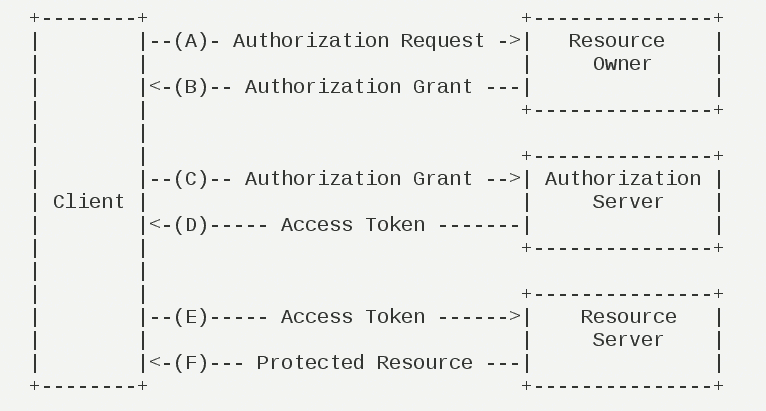
OAuth 2.0的运行流程如下图,摘自RFC 6749。

OAuth运行流程

(A)用户打开客户端以后,客户端要求用户给予授权。

(B)用户同意给予客户端授权。

(C)客户端使用上一步获得的授权,向认证服务器申请令牌。

(D)认证服务器对客户端进行认证以后,确认无误,同意发放令牌。

(E)客户端使用令牌,向资源服务器申请获取资源。

(F)资源服务器确认令牌无误,同意向客户端开放资源。

不难看出来,上面六个步骤之中,B是关键,即用户怎样才能给于客户端授权。有了这个授权以后,客户端就可以获取令牌,进而凭令牌获取资源。

下面一一讲解客户端获取授权的四种模式。

五、客户端的授权模式

客户端必须得到用户的授权(authorization grant),才能获得令牌(access token)。OAuth 2.0定义了四种授权方式。

  • 授权码模式(authorization code)
  • 简化模式(implicit)
  • 密码模式(resource owner password credentials)
  • 客户端模式(client credentials)

六、授权码模式

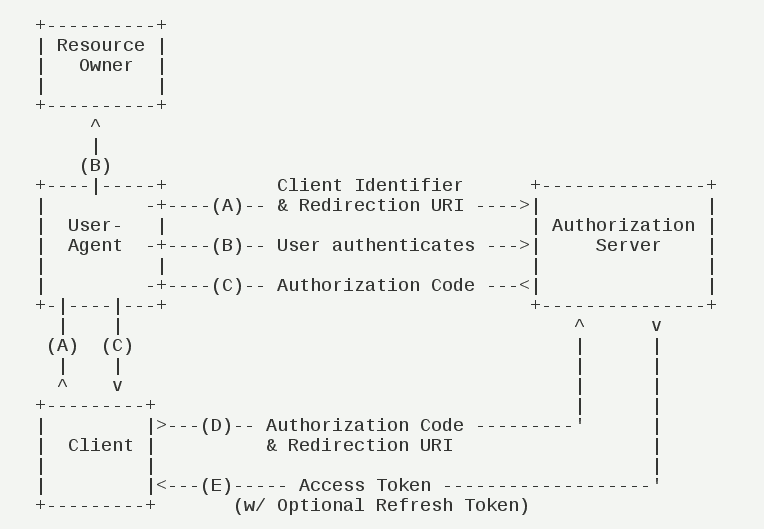
授权码模式(authorization code)是功能最完整、流程最严密的授权模式。它的特点就是通过客户端的后台服务器,与”服务提供商”的认证服务器进行互动。

授权码模式

它的步骤如下:

(A)用户访问客户端,后者将前者导向认证服务器。

(B)用户选择是否给予客户端授权。

(C)假设用户给予授权,认证服务器将用户导向客户端事先指定的”重定向URI”(redirection URI),同时附上一个授权码。

(D)客户端收到授权码,附上早先的”重定向URI”,向认证服务器申请令牌。这一步是在客户端的后台的服务器上完成的,对用户不可见。

(E)认证服务器核对了授权码和重定向URI,确认无误后,向客户端发送访问令牌(access token)和更新令牌(refresh token)。

下面是上面这些步骤所需要的参数。

A步骤中,客户端申请认证的URI,包含以下参数:

  • response_type:表示授权类型,必选项,此处的值固定为”code”
  • client_id:表示客户端的ID,必选项
  • redirect_uri:表示重定向URI,可选项
  • scope:表示申请的权限范围,可选项
  • state:表示客户端的当前状态,可以指定任意值,认证服务器会原封不动地返回这个值。

下面是一个例子。

GET /authorize?response_type=code&client_id=s6BhdRkqt3&state=xyz
&redirect_uri=https%3A%2F%2Fclient%2Eexample%2Ecom%2Fcb HTTP/1.1
Host: server.example.com

C步骤中,服务器回应客户端的URI,包含以下参数:

  • code:表示授权码,必选项。该码的有效期应该很短,通常设为10分钟,客户端只能使用该码一次,否则会被授权服务器拒绝。该码与客户端ID和重定向URI,是一一对应关系。
  • state:如果客户端的请求中包含这个参数,认证服务器的回应也必须一模一样包含这个参数。

下面是一个例子。

HTTP/1.1 302 Found
Location: https://client.example.com/cb?code=SplxlOBeZQQYbYS6WxSbIA
&state=xyz

D步骤中,客户端向认证服务器申请令牌的HTTP请求,包含以下参数:

  • grant_type:表示使用的授权模式,必选项,此处的值固定为”authorization_code”。
  • code:表示上一步获得的授权码,必选项。
  • redirect_uri:表示重定向URI,必选项,且必须与A步骤中的该参数值保持一致。
  • client_id:表示客户端ID,必选项。

下面是一个例子。

POST /token HTTP/1.1
Host: server.example.com
Authorization: Basic czZCaGRSa3F0MzpnWDFmQmF0M2JW
Content-Type: application/x-www-form-urlencoded

grant_type=authorization_code&code=SplxlOBeZQQYbYS6WxSbIA
&redirect_uri=https%3A%2F%2Fclient%2Eexample%2Ecom%2Fcb

E步骤中,认证服务器发送的HTTP回复,包含以下参数:

  • access_token:表示访问令牌,必选项。
  • token_type:表示令牌类型,该值大小写不敏感,必选项,可以是bearer类型或mac类型。
  • expires_in:表示过期时间,单位为秒。如果省略该参数,必须其他方式设置过期时间。
  • refresh_token:表示更新令牌,用来获取下一次的访问令牌,可选项。
  • scope:表示权限范围,如果与客户端申请的范围一致,此项可省略。

下面是一个例子。

HTTP/1.1 200 OK
Content-Type: application/json;charset=UTF-8
Cache-Control: no-store
Pragma: no-cache

     {
       "access_token":"2YotnFZFEjr1zCsicMWpAA",
       "token_type":"example",
       "expires_in":3600,
       "refresh_token":"tGzv3JOkF0XG5Qx2TlKWIA",
       "example_parameter":"example_value"
     }

从上面代码可以看到,相关参数使用JSON格式发送(Content-Type: application/json)。此外,HTTP头信息中明确指定不得缓存。

七、简化模式

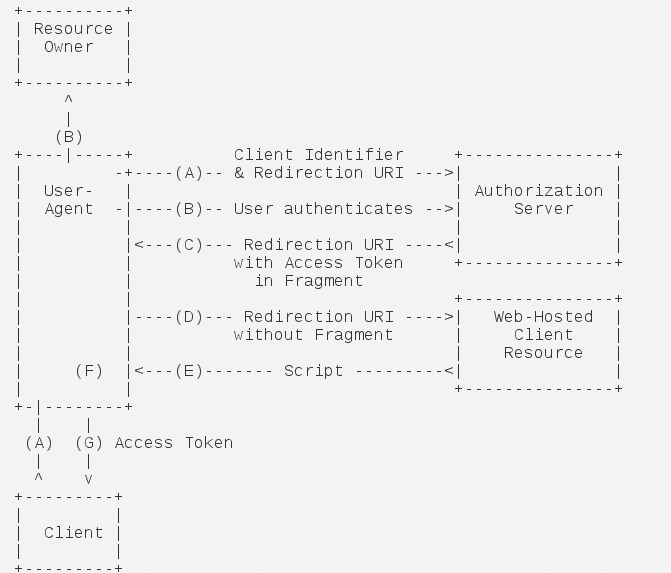
简化模式(implicit grant type)不通过第三方应用程序的服务器,直接在浏览器中向认证服务器申请令牌,跳过了”授权码”这个步骤,因此得名。所有步骤在浏览器中完成,令牌对访问者是可见的,且客户端不需要认证。

简化模式

它的步骤如下:

(A)客户端将用户导向认证服务器。

(B)用户决定是否给于客户端授权。

(C)假设用户给予授权,认证服务器将用户导向客户端指定的”重定向URI”,并在URI的Hash部分包含了访问令牌。

(D)浏览器向资源服务器发出请求,其中不包括上一步收到的Hash值。

(E)资源服务器返回一个网页,其中包含的代码可以获取Hash值中的令牌。

(F)浏览器执行上一步获得的脚本,提取出令牌。

(G)浏览器将令牌发给客户端。

下面是上面这些步骤所需要的参数。

A步骤中,客户端发出的HTTP请求,包含以下参数:

  • response_type:表示授权类型,此处的值固定为”token”,必选项。
  • client_id:表示客户端的ID,必选项。
  • redirect_uri:表示重定向的URI,可选项。
  • scope:表示权限范围,可选项。
  • state:表示客户端的当前状态,可以指定任意值,认证服务器会原封不动地返回这个值。

下面是一个例子。

GET /authorize?response_type=token&client_id=s6BhdRkqt3&state=xyz
&redirect_uri=https%3A%2F%2Fclient%2Eexample%2Ecom%2Fcb HTTP/1.1
Host: server.example.com

C步骤中,认证服务器回应客户端的URI,包含以下参数:

  • access_token:表示访问令牌,必选项。
  • token_type:表示令牌类型,该值大小写不敏感,必选项。
  • expires_in:表示过期时间,单位为秒。如果省略该参数,必须其他方式设置过期时间。
  • scope:表示权限范围,如果与客户端申请的范围一致,此项可省略。
  • state:如果客户端的请求中包含这个参数,认证服务器的回应也必须一模一样包含这个参数。

下面是一个例子。

HTTP/1.1 302 Found
Location: http://example.com/cb#access_token=2YotnFZFEjr1zCsicMWpAA
&state=xyz&token_type=example&expires_in=3600

在上面的例子中,认证服务器用HTTP头信息的Location栏,指定浏览器重定向的网址。注意,在这个网址的Hash部分包含了令牌。

根据上面的D步骤,下一步浏览器会访问Location指定的网址,但是Hash部分不会发送。接下来的E步骤,服务提供商的资源服务器发送过来的代码,会提取出Hash中的令牌。

八、密码模式

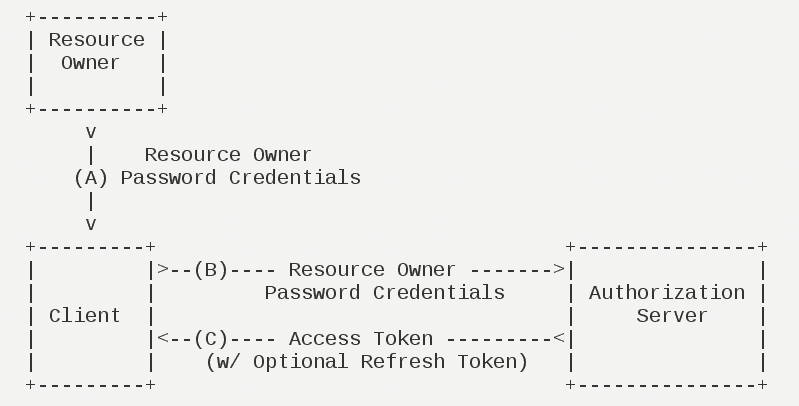
密码模式(Resource Owner Password Credentials Grant)中,用户向客户端提供自己的用户名和密码。客户端使用这些信息,向”服务商提供商”索要授权。

在这种模式中,用户必须把自己的密码给客户端,但是客户端不得储存密码。这通常用在用户对客户端高度信任的情况下,比如客户端是操作系统的一部分,或者由一个著名公司出品。而认证服务器只有在其他授权模式无法执行的情况下,才能考虑使用这种模式。

密码模式

它的步骤如下:

(A)用户向客户端提供用户名和密码。

(B)客户端将用户名和密码发给认证服务器,向后者请求令牌。

(C)认证服务器确认无误后,向客户端提供访问令牌。

B步骤中,客户端发出的HTTP请求,包含以下参数:

  • grant_type:表示授权类型,此处的值固定为”password”,必选项。
  • username:表示用户名,必选项。
  • password:表示用户的密码,必选项。
  • scope:表示权限范围,可选项。

下面是一个例子。

POST /token HTTP/1.1
Host: server.example.com
Authorization: Basic czZCaGRSa3F0MzpnWDFmQmF0M2JW
Content-Type: application/x-www-form-urlencoded

     grant_type=password&username=johndoe&password=A3ddj3w

C步骤中,认证服务器向客户端发送访问令牌,下面是一个例子。

HTTP/1.1 200 OK
Content-Type: application/json;charset=UTF-8
Cache-Control: no-store
Pragma: no-cache

     {
       "access_token":"2YotnFZFEjr1zCsicMWpAA",
       "token_type":"example",
       "expires_in":3600,
       "refresh_token":"tGzv3JOkF0XG5Qx2TlKWIA",
       "example_parameter":"example_value"
     }

上面代码中,各个参数的含义参见《授权码模式》一节。

整个过程中,客户端不得保存用户的密码。

九、客户端模式

客户端模式(Client Credentials Grant)指客户端以自己的名义,而不是以用户的名义,向”服务提供商”进行认证。严格地说,客户端模式并不属于OAuth框架所要解决的问题。在这种模式中,用户直接向客户端注册,客户端以自己的名义要求”服务提供商”提供服务,其实不存在授权问题。

客户端模式

它的步骤如下:

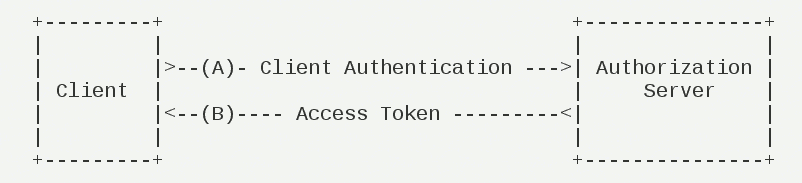
(A)客户端向认证服务器进行身份认证,并要求一个访问令牌。

(B)认证服务器确认无误后,向客户端提供访问令牌。

A步骤中,客户端发出的HTTP请求,包含以下参数:

  • grant_type:表示授权类型,此处的值固定为”client_credentials”,必选项。
  • scope:表示权限范围,可选项。

POST /token HTTP/1.1
Host: server.example.com
Authorization: Basic czZCaGRSa3F0MzpnWDFmQmF0M2JW
Content-Type: application/x-www-form-urlencoded

     grant_type=client_credentials

认证服务器必须以某种方式,验证客户端身份。

B步骤中,认证服务器向客户端发送访问令牌,下面是一个例子。

HTTP/1.1 200 OK
Content-Type: application/json;charset=UTF-8
Cache-Control: no-store
Pragma: no-cache

     {
       "access_token":"2YotnFZFEjr1zCsicMWpAA",
       "token_type":"example",
       "expires_in":3600,
       "example_parameter":"example_value"
     }

上面代码中,各个参数的含义参见《授权码模式》一节。

十、更新令牌

如果用户访问的时候,客户端的”访问令牌”已经过期,则需要使用”更新令牌”申请一个新的访问令牌。

客户端发出更新令牌的HTTP请求,包含以下参数:

  • grant_type:表示使用的授权模式,此处的值固定为”refresh_token”,必选项。
  • refresh_token:表示早前收到的更新令牌,必选项。
  • scope:表示申请的授权范围,不可以超出上一次申请的范围,如果省略该参数,则表示与上一次一致。

下面是一个例子。

POST /token HTTP/1.1
Host: server.example.com
Authorization: Basic czZCaGRSa3F0MzpnWDFmQmF0M2JW
Content-Type: application/x-www-form-urlencoded

     grant_type=refresh_token&refresh_token=tGzv3JOkF0XG5Qx2TlKWIA

(完)


出处:http://www.ruanyifeng.com/2014/05/oauth_2_0.html

文章作者:jqpeng
原文链接: 基于spring security 实现前后端分离项目权限控制

前后端分离的项目,前端有菜单(menu),后端有API(backendApi),一个menu对应的页面有N个API接口来支持,本文介绍如何基于spring security实现前后端的同步权限控制。

实现思路

还是基于Role来实现,具体的思路是,一个Role拥有多个Menu,一个menu有多个backendApi,其中Role和menu,以及menu和backendApi都是ManyToMany关系。

验证授权也很简单,用户登陆系统时,获取Role关联的Menu,页面访问后端API时,再验证下用户是否有访问API的权限。

domain定义

我们用JPA来实现,先来定义Role

public class Role implements Serializable {


    @Id
    @GeneratedValue(strategy = GenerationType.IDENTITY)
    private Long id;

    /**
     * 名称
     */
    @NotNull
    @ApiModelProperty(value = "名称", required = true)
    @Column(name = "name", nullable = false)
    private String name;

    /**
     * 备注
     */
    @ApiModelProperty(value = "备注")
    @Column(name = "remark")
    private String remark;

    @JsonIgnore
    @ManyToMany
    @JoinTable(
        name = "role_menus",
        joinColumns = {@JoinColumn(name = "role_id", referencedColumnName = "id")},
        inverseJoinColumns = {@JoinColumn(name = "menu_id", referencedColumnName = "id")})
    @Cache(usage = CacheConcurrencyStrategy.NONSTRICT_READ_WRITE)
    @BatchSize(size = 100)
    private Set<Menu> menus = new HashSet<>();}

以及Menu:

public class Menu implements Serializable {


    @Id
    @GeneratedValue(strategy = GenerationType.IDENTITY)
    private Long id;

    @Column(name = "parent_id")
    private Integer parentId;

    /**
     * 文本
     */
    @ApiModelProperty(value = "文本")
    @Column(name = "text")
    private String text;@ApiModelProperty(value = "angular路由")
    @Column(name = "link")
    private String link;
    @ManyToMany
    @JsonIgnore
    @JoinTable(name = "backend_api_menus",
        joinColumns = @JoinColumn(name="menus_id", referencedColumnName="id"),
        inverseJoinColumns = @JoinColumn(name="backend_apis_id", referencedColumnName="id"))
    @Cache(usage = CacheConcurrencyStrategy.NONSTRICT_READ_WRITE)
    private Set<BackendApi> backendApis = new HashSet<>();

    @ManyToMany(mappedBy = "menus")
    @JsonIgnore
    private Set<Role> roles = new HashSet<>();}

最后是BackendApi,区分method(HTTP请求方法)、tag(哪一个Controller)和path(API请求路径):

public class BackendApi implements Serializable {

    private static final long serialVersionUID = 1L;

    @Id
    @GeneratedValue(strategy = GenerationType.IDENTITY)
    private Long id;

    @Column(name = "tag")
    private String tag;

    @Column(name = "path")
    private String path;

    @Column(name = "method")
    private String method;

    @Column(name = "summary")
    private String summary;

    @Column(name = "operation_id")
    private String operationId;

    @ManyToMany(mappedBy = "backendApis")
    @Cache(usage = CacheConcurrencyStrategy.NONSTRICT_READ_WRITE)
    private Set<Menu> menus = new HashSet<>();}

管理页面实现

Menu菜单是业务需求确定的,因此提供CRUD编辑即可。
BackendAPI,可以通过swagger来获取。
前端选择ng-algin,参见Angular 中后台前端解决方案 - Ng Alain 介绍

通过swagger获取BackendAPI

获取swagger api有多种方法,最简单的就是访问http接口获取json,然后解析,这很简单,这里不赘述,还有一种就是直接调用相关API获取Swagger对象。

查看官方的web代码,可以看到获取数据大概是这样的:

        String groupName = Optional.fromNullable(swaggerGroup).or(Docket.DEFAULT_GROUP_NAME);
        Documentation documentation = documentationCache.documentationByGroup(groupName);
        if (documentation == null) {
            return new ResponseEntity<Json>(HttpStatus.NOT_FOUND);
        }
        Swagger swagger = mapper.mapDocumentation(documentation);
        UriComponents uriComponents = componentsFrom(servletRequest, swagger.getBasePath());
        swagger.basePath(Strings.isNullOrEmpty(uriComponents.getPath()) ? "/" : uriComponents.getPath());
        if (isNullOrEmpty(swagger.getHost())) {
            swagger.host(hostName(uriComponents));
        }
        return new ResponseEntity<Json>(jsonSerializer.toJson(swagger), HttpStatus.OK);

其中的documentationCache、environment、mapper等可以直接Autowired获得:

@Autowired
    public SwaggerResource(
        Environment environment,
        DocumentationCache documentationCache,
        ServiceModelToSwagger2Mapper mapper,
        BackendApiRepository backendApiRepository,
        JsonSerializer jsonSerializer) {

        this.hostNameOverride = environment.getProperty("springfox.documentation.swagger.v2.host", "DEFAULT");
        this.documentationCache = documentationCache;
        this.mapper = mapper;
        this.jsonSerializer = jsonSerializer;

        this.backendApiRepository = backendApiRepository;

    }

然后我们自动加载就简单了,写一个updateApi接口,读取swagger对象,然后解析成BackendAPI,存储到数据库:

@RequestMapping(
        value = "/api/updateApi",
        method = RequestMethod.GET,
        produces = { APPLICATION_JSON_VALUE, HAL_MEDIA_TYPE })
    @PropertySourcedMapping(
        value = "${springfox.documentation.swagger.v2.path}",
        propertyKey = "springfox.documentation.swagger.v2.path")
    @ResponseBody
    public ResponseEntity<Json> updateApi(
        @RequestParam(value = "group", required = false) String swaggerGroup) {

        // 加载已有的api
        Map<String,Boolean> apiMap = Maps.newHashMap();
        List<BackendApi> apis = backendApiRepository.findAll();
        apis.stream().forEach(api->apiMap.put(api.getPath()+api.getMethod(),true));

        // 获取swagger
        String groupName = Optional.fromNullable(swaggerGroup).or(Docket.DEFAULT_GROUP_NAME);
        Documentation documentation = documentationCache.documentationByGroup(groupName);
        if (documentation == null) {
            return new ResponseEntity<Json>(HttpStatus.NOT_FOUND);
        }
        Swagger swagger = mapper.mapDocumentation(documentation);

        // 加载到数据库
        for(Map.Entry<String, Path> item : swagger.getPaths().entrySet()){
            String path = item.getKey();
            Path pathInfo = item.getValue();
            createApiIfNeeded(apiMap, path,  pathInfo.getGet(), HttpMethod.GET.name());
            createApiIfNeeded(apiMap, path,  pathInfo.getPost(), HttpMethod.POST.name());
            createApiIfNeeded(apiMap, path,  pathInfo.getDelete(), HttpMethod.DELETE.name());
            createApiIfNeeded(apiMap, path,  pathInfo.getPut(), HttpMethod.PUT.name());
        }
        return new ResponseEntity<Json>(HttpStatus.OK);
    }

其中createApiIfNeeded,先判断下是否存在,不存在的则新增:

 private void createApiIfNeeded(Map<String, Boolean> apiMap, String path, Operation operation, String method) {
        if(operation==null) {
            return;
        }
        if(!apiMap.containsKey(path+ method)){
            apiMap.put(path+ method,true);

            BackendApi api = new BackendApi();
            api.setMethod( method);
            api.setOperationId(operation.getOperationId());
            api.setPath(path);
            api.setTag(operation.getTags().get(0));
            api.setSummary(operation.getSummary());

            // 保存
            this.backendApiRepository.save(api);
        }
    }

最后,做一个简单页面展示即可:

enter description here

菜单管理

新增和修改页面,可以选择上级菜单,后台API做成按tag分组,可多选即可:

enter description here

列表页面

enter description here

角色管理

普通的CRUD,最主要的增加一个菜单授权页面,菜单按层级显示即可:

enter description here

认证实现

管理页面可以做成千奇百样,最核心的还是如何实现认证。

在上一篇文章spring security实现动态配置url权限的两种方法里我们说了,可以自定义FilterInvocationSecurityMetadataSource来实现。

实现FilterInvocationSecurityMetadataSource接口即可,核心是根据FilterInvocation的Request的method和path,获取对应的Role,然后交给RoleVoter去判断是否有权限。

自定义FilterInvocationSecurityMetadataSource

我们新建一个DaoSecurityMetadataSource实现FilterInvocationSecurityMetadataSource接口,主要看getAttributes方法:

     @Override
    public Collection<ConfigAttribute> getAttributes(Object object) throws IllegalArgumentException {
        FilterInvocation fi = (FilterInvocation) object;

        List<Role> neededRoles = this.getRequestNeededRoles(fi.getRequest().getMethod(), fi.getRequestUrl());

        if (neededRoles != null) {
            return SecurityConfig.createList(neededRoles.stream().map(role -> role.getName()).collect(Collectors.toList()).toArray(new String[]{}));
        }

        //  返回默认配置
        return superMetadataSource.getAttributes(object);
    }

核心是getRequestNeededRoles怎么实现,获取到干净的RequestUrl(去掉参数),然后看是否有对应的backendAPI,如果没有,则有可能该API有path参数,我们可以去掉最后的path,去库里模糊匹配,直到找到。

 public List<Role> getRequestNeededRoles(String method, String path) {
        String rawPath = path;
        //  remove parameters
        if(path.indexOf("?")>-1){
            path = path.substring(0,path.indexOf("?"));
        }
        // /menus/{id}
        BackendApi api = backendApiRepository.findByPathAndMethod(path, method);
        if (api == null){
            // try fetch by remove last path
            api = loadFromSimilarApi(method, path, rawPath);
        }

        if (api != null && api.getMenus().size() > 0) {
            return api.getMenus()
                .stream()
                .flatMap(menu -> menuRepository.findOneWithRolesById(menu.getId()).getRoles().stream())
                .collect(Collectors.toList());
        }
        return null;
    }

    private BackendApi loadFromSimilarApi(String method, String path, String rawPath) {
        if(path.lastIndexOf("/")>-1){
            path = path.substring(0,path.lastIndexOf("/"));
            List<BackendApi> apis = backendApiRepository.findByPathStartsWithAndMethod(path, method);

            // 如果为空,再去掉一层path
            while(apis==null){
                if(path.lastIndexOf("/")>-1) {
                    path = path.substring(0, path.lastIndexOf("/"));
                    apis = backendApiRepository.findByPathStartsWithAndMethod(path, method);
                }else{
                    break;
                }
            }

            if(apis!=null){
                for(BackendApi backendApi : apis){
                    if (antPathMatcher.match(backendApi.getPath(), rawPath)) {
                        return backendApi;
                    }
                }
            }
        }
        return null;
    }

其中,BackendApiRepository:

    @EntityGraph(attributePaths = "menus")
    BackendApi findByPathAndMethod(String path,String method);

    @EntityGraph(attributePaths = "menus")
    List<BackendApi> findByPathStartsWithAndMethod(String path,String method);

以及MenuRepository

    @EntityGraph(attributePaths = "roles")
    Menu findOneWithRolesById(long id);

使用DaoSecurityMetadataSource

需要注意的是,在DaoSecurityMetadataSource里,不能直接注入Repository,我们可以给DaoSecurityMetadataSource添加一个方法,方便传入:

   public void init(MenuRepository menuRepository, BackendApiRepository backendApiRepository) {
        this.menuRepository = menuRepository;
        this.backendApiRepository = backendApiRepository;
    }

然后建立一个容器,存储实例化的DaoSecurityMetadataSource,我们可以建立如下的ApplicationContext来作为对象容器,存取对象:

public class ApplicationContext {
    static Map<Class<?>,Object> beanMap = Maps.newConcurrentMap();

    public static <T> T getBean(Class<T> requireType){
        return (T) beanMap.get(requireType);
    }

    public static void registerBean(Object item){
        beanMap.put(item.getClass(),item);
    }
}

在SecurityConfiguration配置中使用DaoSecurityMetadataSource,并通过 ApplicationContext.registerBean将DaoSecurityMetadataSource注册:

 @Override
    protected void configure(HttpSecurity http) throws Exception {
        http
            .addFilterBefore(corsFilter, UsernamePasswordAuthenticationFilter.class)
            .exceptionHandling()
            .authenticationEntryPoint(problemSupport)
            .accessDeniedHandler(problemSupport)        ....
           // .withObjectPostProcessor()
            // 自定义accessDecisionManager
            .accessDecisionManager(accessDecisionManager())
            // 自定义FilterInvocationSecurityMetadataSource
            .withObjectPostProcessor(new ObjectPostProcessor<FilterSecurityInterceptor>() {
                @Override
                public <O extends FilterSecurityInterceptor> O postProcess(
                    O fsi) {
                    fsi.setSecurityMetadataSource(daoSecurityMetadataSource(fsi.getSecurityMetadataSource()));
                    return fsi;
                }
            })
        .and()
            .apply(securityConfigurerAdapter());

    }

    @Bean
    public DaoSecurityMetadataSource daoSecurityMetadataSource(FilterInvocationSecurityMetadataSource filterInvocationSecurityMetadataSource) {
        DaoSecurityMetadataSource securityMetadataSource = new DaoSecurityMetadataSource(filterInvocationSecurityMetadataSource);
        ApplicationContext.registerBean(securityMetadataSource);
        return securityMetadataSource;
    }

最后,在程序启动后,通过ApplicationContext.getBean获取到daoSecurityMetadataSource,然后调用init注入Repository

 public static void postInit(){
        ApplicationContext
            .getBean(DaoSecurityMetadataSource.class)
 .init(applicationContext.getBean(MenuRepository.class),applicationContext.getBean(BackendApiRepository.class));
    }

    static ConfigurableApplicationContext applicationContext;

    public static void main(String[] args) throws UnknownHostException {
        SpringApplication app = new SpringApplication(UserCenterApp.class);
        DefaultProfileUtil.addDefaultProfile(app);
        applicationContext = app.run(args);

        // 后初始化
        postInit();
}

大功告成!

延伸阅读


作者:Jadepeng
出处:jqpeng的技术记事本–http://www.cnblogs.com/xiaoqi
您的支持是对博主最大的鼓励,感谢您的认真阅读。
本文版权归作者所有,欢迎转载,但未经作者同意必须保留此段声明,且在文章页面明显位置给出原文连接,否则保留追究法律责任的权利。

文章作者:jqpeng
原文链接: spring security实现动态配置url权限的两种方法

缘起

标准的RABC, 权限需要支持动态配置,spring security默认是在代码里约定好权限,真实的业务场景通常需要可以支持动态配置角色访问权限,即在运行时去配置url对应的访问角色。

基于spring security,如何实现这个需求呢?

最简单的方法就是自定义一个Filter去完成权限判断,但这脱离了spring security框架,如何基于spring security优雅的实现呢?

spring security 授权回顾

spring security 通过FilterChainProxy作为注册到web的filter,FilterChainProxy里面一次包含了内置的多个过滤器,我们首先需要了解spring security内置的各种filter:

Alias Filter Class Namespace Element or Attribute
CHANNEL_FILTER ChannelProcessingFilter http/intercept-url@requires-channel
SECURITY_CONTEXT_FILTER SecurityContextPersistenceFilter http
CONCURRENT_SESSION_FILTER ConcurrentSessionFilter session-management/concurrency-control
HEADERS_FILTER HeaderWriterFilter http/headers
CSRF_FILTER CsrfFilter http/csrf
LOGOUT_FILTER LogoutFilter http/logout
X509_FILTER X509AuthenticationFilter http/x509
PRE_AUTH_FILTER AbstractPreAuthenticatedProcessingFilter Subclasses N/A
CAS_FILTER CasAuthenticationFilter N/A
FORM_LOGIN_FILTER UsernamePasswordAuthenticationFilter http/form-login
BASIC_AUTH_FILTER BasicAuthenticationFilter http/http-basic
SERVLET_API_SUPPORT_FILTER SecurityContextHolderAwareRequestFilter http/@servlet-api-provision
JAAS_API_SUPPORT_FILTER JaasApiIntegrationFilter http/@jaas-api-provision
REMEMBER_ME_FILTER RememberMeAuthenticationFilter http/remember-me
ANONYMOUS_FILTER AnonymousAuthenticationFilter http/anonymous
SESSION_MANAGEMENT_FILTER SessionManagementFilter session-management
EXCEPTION_TRANSLATION_FILTER ExceptionTranslationFilter http
FILTER_SECURITY_INTERCEPTOR FilterSecurityInterceptor http
SWITCH_USER_FILTER SwitchUserFilter N/A

最重要的是FilterSecurityInterceptor,该过滤器实现了主要的鉴权逻辑,最核心的代码在这里:

protected InterceptorStatusToken beforeInvocation(Object object) {    // 获取访问URL所需权限    Collection<ConfigAttribute> attributes = this.obtainSecurityMetadataSource()            .getAttributes(object);
    Authentication authenticated = authenticateIfRequired();
    // 通过accessDecisionManager鉴权    try {        this.accessDecisionManager.decide(authenticated, object, attributes);    }    catch (AccessDeniedException accessDeniedException) {        publishEvent(new AuthorizationFailureEvent(object, attributes, authenticated,                accessDeniedException));
        throw accessDeniedException;    }
    if (debug) {        logger.debug("Authorization successful");    }
    if (publishAuthorizationSuccess) {        publishEvent(new AuthorizedEvent(object, attributes, authenticated));    }
    // Attempt to run as a different user    Authentication runAs = this.runAsManager.buildRunAs(authenticated, object,            attributes);
    if (runAs == null) {        if (debug) {            logger.debug("RunAsManager did not change Authentication object");        }
        // no further work post-invocation        return new InterceptorStatusToken(SecurityContextHolder.getContext(), false,                attributes, object);    }    else {        if (debug) {            logger.debug("Switching to RunAs Authentication: " + runAs);        }
        SecurityContext origCtx = SecurityContextHolder.getContext();        SecurityContextHolder.setContext(SecurityContextHolder.createEmptyContext());        SecurityContextHolder.getContext().setAuthentication(runAs);
        // need to revert to token.Authenticated post-invocation        return new InterceptorStatusToken(origCtx, true, attributes, object);    }}

从上面可以看出,要实现动态鉴权,可以从两方面着手:

  • 自定义SecurityMetadataSource,实现从数据库加载ConfigAttribute
  • 另外就是可以自定义accessDecisionManager,官方的UnanimousBased其实足够使用,并且他是基于AccessDecisionVoter来实现权限认证的,因此我们只需要自定义一个AccessDecisionVoter就可以了

下面来看分别如何实现。

自定义AccessDecisionManager

官方的三个AccessDecisionManager都是基于AccessDecisionVoter来实现权限认证的,因此我们只需要自定义一个AccessDecisionVoter就可以了。

自定义主要是实现AccessDecisionVoter接口,我们可以仿照官方的RoleVoter实现一个:

public class RoleBasedVoter implements AccessDecisionVoter<Object> {

    @Override
    public boolean supports(ConfigAttribute attribute) {
        return true;
    }

    @Override
    public int vote(Authentication authentication, Object object, Collection<ConfigAttribute> attributes) {
        if(authentication == null) {
            return ACCESS_DENIED;
        }
        int result = ACCESS_ABSTAIN;
        Collection<? extends GrantedAuthority> authorities = extractAuthorities(authentication);

        for (ConfigAttribute attribute : attributes) {
            if(attribute.getAttribute()==null){
                continue;
            }
            if (this.supports(attribute)) {
                result = ACCESS_DENIED;

                // Attempt to find a matching granted authority
                for (GrantedAuthority authority : authorities) {
                    if (attribute.getAttribute().equals(authority.getAuthority())) {
                        return ACCESS_GRANTED;
                    }
                }
            }
        }

        return result;
    }

    Collection<? extends GrantedAuthority> extractAuthorities(
        Authentication authentication) {
        return authentication.getAuthorities();
    }

    @Override
    public boolean supports(Class clazz) {
        return true;
    }
}

如何加入动态权限呢?

vote(Authentication authentication, Object object, Collection<ConfigAttribute> attributes) 里的Object object的类型是FilterInvocation,可以通过getRequestUrl获取当前请求的URL:

  FilterInvocation fi = (FilterInvocation) object;
  String url = fi.getRequestUrl();

因此这里扩展空间就大了,可以从DB动态加载,然后判断URL的ConfigAttribute就可以了。

如何使用这个RoleBasedVoter呢?在configure里使用accessDecisionManager方法自定义,我们还是使用官方的UnanimousBased,然后将自定义的RoleBasedVoter加入即可。

@EnableWebSecurity
@EnableGlobalMethodSecurity(prePostEnabled = true, securedEnabled = true)
public class SecurityConfiguration extends WebSecurityConfigurerAdapter {

 
    @Override
    protected void configure(HttpSecurity http) throws Exception {
        http
            .addFilterBefore(corsFilter, UsernamePasswordAuthenticationFilter.class)
            .exceptionHandling()
            .authenticationEntryPoint(problemSupport)
            .accessDeniedHandler(problemSupport)
        .and()
            .csrf()
            .disable()
            .headers()
            .frameOptions()
            .disable()
        .and()
            .sessionManagement()
            .sessionCreationPolicy(SessionCreationPolicy.STATELESS)
        .and()
            .authorizeRequests()
            // 自定义accessDecisionManager
            .accessDecisionManager(accessDecisionManager())
          
        .and()
            .apply(securityConfigurerAdapter());

    }


    @Bean
    public AccessDecisionManager accessDecisionManager() {
        List<AccessDecisionVoter<? extends Object>> decisionVoters
            = Arrays.asList(
            new WebExpressionVoter(),
            // new RoleVoter(),
            new RoleBasedVoter(),
            new AuthenticatedVoter());
        return new UnanimousBased(decisionVoters);
    }

自定义SecurityMetadataSource

自定义FilterInvocationSecurityMetadataSource只要实现接口即可,在接口里从DB动态加载规则。

为了复用代码里的定义,我们可以将代码里生成的SecurityMetadataSource带上,在构造函数里传入默认的FilterInvocationSecurityMetadataSource。

public class AppFilterInvocationSecurityMetadataSource implements org.springframework.security.web.access.intercept.FilterInvocationSecurityMetadataSource {

    private FilterInvocationSecurityMetadataSource  superMetadataSource;

    @Override
    public Collection<ConfigAttribute> getAllConfigAttributes() {
        return null;
    }

    public AppFilterInvocationSecurityMetadataSource(FilterInvocationSecurityMetadataSource expressionBasedFilterInvocationSecurityMetadataSource){
         this.superMetadataSource = expressionBasedFilterInvocationSecurityMetadataSource;

         // TODO 从数据库加载权限配置
    }

    private final AntPathMatcher antPathMatcher = new AntPathMatcher();
    // 这里的需要从DB加载
    private final Map<String,String> urlRoleMap = new HashMap<String,String>(){{
            put("/open/**","ROLE_ANONYMOUS");
            put("/health","ROLE_ANONYMOUS");
            put("/restart","ROLE_ADMIN");
            put("/demo","ROLE_USER");
        }};

    @Override
    public Collection<ConfigAttribute> getAttributes(Object object) throws IllegalArgumentException {
        FilterInvocation fi = (FilterInvocation) object;
        String url = fi.getRequestUrl();

        for(Map.Entry<String,String> entry:urlRoleMap.entrySet()){
            if(antPathMatcher.match(entry.getKey(),url)){
                return SecurityConfig.createList(entry.getValue());
            }
        }

        //  返回代码定义的默认配置
        return superMetadataSource.getAttributes(object);
    }


    @Override
    public boolean supports(Class<?> clazz) {
        return FilterInvocation.class.isAssignableFrom(clazz);
    }
}

怎么使用?和accessDecisionManager不一样,ExpressionUrlAuthorizationConfigurer 并没有提供set方法设置FilterSecurityInterceptor的FilterInvocationSecurityMetadataSource,how to do?

发现一个扩展方法withObjectPostProcessor,通过该方法自定义一个处理FilterSecurityInterceptor类型的ObjectPostProcessor就可以修改FilterSecurityInterceptor。

@EnableWebSecurity
@EnableGlobalMethodSecurity(prePostEnabled = true, securedEnabled = true)
public class SecurityConfiguration extends WebSecurityConfigurerAdapter {

 
    @Override
    protected void configure(HttpSecurity http) throws Exception {
        http
            .addFilterBefore(corsFilter, UsernamePasswordAuthenticationFilter.class)
            .exceptionHandling()
            .authenticationEntryPoint(problemSupport)
            .accessDeniedHandler(problemSupport)
        .and()
            .csrf()
            .disable()
            .headers()
            .frameOptions()
            .disable()
        .and()
            .sessionManagement()
            .sessionCreationPolicy(SessionCreationPolicy.STATELESS)
        .and()
            .authorizeRequests()
              // 自定义FilterInvocationSecurityMetadataSource
            .withObjectPostProcessor(new ObjectPostProcessor<FilterSecurityInterceptor>() {
                @Override
                public <O extends FilterSecurityInterceptor> O postProcess(
                    O fsi) {
                    fsi.setSecurityMetadataSource(mySecurityMetadataSource(fsi.getSecurityMetadataSource()));
                    return fsi;
                }
            })
        .and()
            .apply(securityConfigurerAdapter());

    }


    @Bean
    public AppFilterInvocationSecurityMetadataSource mySecurityMetadataSource(FilterInvocationSecurityMetadataSource filterInvocationSecurityMetadataSource) {
        AppFilterInvocationSecurityMetadataSource securityMetadataSource = new AppFilterInvocationSecurityMetadataSource(filterInvocationSecurityMetadataSource);
        return securityMetadataSource;
}

小结

本文介绍了两种基于spring security实现动态权限的方法,一是自定义accessDecisionManager,二是自定义FilterInvocationSecurityMetadataSource。实际项目里可以根据需要灵活选择。

延伸阅读:

Spring Security 架构与源码分析


作者:Jadepeng
出处:jqpeng的技术记事本–http://www.cnblogs.com/xiaoqi
您的支持是对博主最大的鼓励,感谢您的认真阅读。
本文版权归作者所有,欢迎转载,但未经作者同意必须保留此段声明,且在文章页面明显位置给出原文连接,否则保留追究法律责任的权利。

文章作者:jqpeng
原文链接: Spring Security 架构与源码分析

Spring Security 主要实现了Authentication(认证,解决who are you? ) 和 Access Control(访问控制,也就是what are you allowed to do?,也称为Authorization)。Spring Security在架构上将认证与授权分离,并提供了扩展点。

核心对象

主要代码在spring-security-core包下面。要了解Spring Security,需要先关注里面的核心对象。

SecurityContextHolder, SecurityContext 和 Authentication

SecurityContextHolder 是 SecurityContext的存放容器,默认使用ThreadLocal 存储,意味SecurityContext在相同线程中的方法都可用。
SecurityContext主要是存储应用的principal信息,在Spring Security中用Authentication 来表示。

获取principal:

Object principal = SecurityContextHolder.getContext().getAuthentication().getPrincipal();

if (principal instanceof UserDetails) {
String username = ((UserDetails)principal).getUsername();
} else {
String username = principal.toString();
}

在Spring Security中,可以看一下Authentication定义:

public interface Authentication extends Principal, Serializable {
Collection<? extends GrantedAuthority> getAuthorities();
/** * 通常是密码 */Object getCredentials();
/** * Stores additional details about the authentication request. These might be an IP * address, certificate serial number etc. */Object getDetails();
/** * 用来标识是否已认证,如果使用用户名和密码登录,通常是用户名  */Object getPrincipal();
/** * 是否已认证 */boolean isAuthenticated();
void setAuthenticated(boolean isAuthenticated) throws IllegalArgumentException;
}

在实际应用中,通常使用UsernamePasswordAuthenticationToken:

public abstract class AbstractAuthenticationToken implements Authentication,    CredentialsContainer {    }
public class UsernamePasswordAuthenticationToken extends AbstractAuthenticationToken {
}

一个常见的认证过程通常是这样的,创建一个UsernamePasswordAuthenticationToken,然后交给authenticationManager认证(后面详细说明),认证通过则通过SecurityContextHolder存放Authentication信息。

 UsernamePasswordAuthenticationToken authenticationToken =
            new UsernamePasswordAuthenticationToken(loginVM.getUsername(), loginVM.getPassword());

Authentication authentication = this.authenticationManager.authenticate(authenticationToken);
SecurityContextHolder.getContext().setAuthentication(authentication);

UserDetails与UserDetailsService

UserDetails 是Spring Security里的一个关键接口,他用来表示一个principal。

public interface UserDetails extends Serializable {/** * 用户的授权信息,可以理解为角色 */Collection<? extends GrantedAuthority> getAuthorities();
/** * 用户密码 * * @return the password */String getPassword();
/** * 用户名  *     */String getUsername();
boolean isAccountNonExpired();
boolean isAccountNonLocked();
boolean isCredentialsNonExpired();
boolean isEnabled();
}

UserDetails提供了认证所需的必要信息,在实际使用里,可以自己实现UserDetails,并增加额外的信息,比如email、mobile等信息。

在Authentication中的principal通常是用户名,我们可以通过UserDetailsService来通过principal获取UserDetails:

public interface UserDetailsService {UserDetails loadUserByUsername(String username) throws UsernameNotFoundException;
}

GrantedAuthority

在UserDetails里说了,GrantedAuthority可以理解为角色,例如 ROLE_ADMINISTRATOR or ROLE_HR_SUPERVISOR。

小结

  • SecurityContextHolder, 用来访问 SecurityContext.
  • SecurityContext, 用来存储Authentication .
  • Authentication, 代表凭证.
  • GrantedAuthority, 代表权限.
  • UserDetails, 用户信息.
  • UserDetailsService,获取用户信息.

Authentication认证

AuthenticationManager

实现认证主要是通过AuthenticationManager接口,它只包含了一个方法:

public interface AuthenticationManager {
  Authentication authenticate(Authentication authentication)
    throws AuthenticationException;
}

authenticate()方法主要做三件事:

  1. 如果验证通过,返回Authentication(通常带上authenticated=true)。
  2. 认证失败抛出AuthenticationException
  3. 如果无法确定,则返回null

AuthenticationException是运行时异常,它通常由应用程序按通用方式处理,用户代码通常不用特意被捕获和处理这个异常。

AuthenticationManager的默认实现是ProviderManager,它委托一组AuthenticationProvider实例来实现认证。
AuthenticationProvider和AuthenticationManager类似,都包含authenticate,但它有一个额外的方法supports,以允许查询调用方是否支持给定Authentication类型:

public interface AuthenticationProvider {
Authentication authenticate(Authentication authentication)        throws AuthenticationException;boolean supports(Class<?> authentication);
}

ProviderManager包含一组AuthenticationProvider,执行authenticate时,遍历Providers,然后调用supports,如果支持,则执行遍历当前provider的authenticate方法,如果一个provider认证成功,则break。

public Authentication authenticate(Authentication authentication)        throws AuthenticationException {    Class<? extends Authentication> toTest = authentication.getClass();    AuthenticationException lastException = null;    Authentication result = null;    boolean debug = logger.isDebugEnabled();
    for (AuthenticationProvider provider : getProviders()) {        if (!provider.supports(toTest)) {            continue;        }
        if (debug) {            logger.debug("Authentication attempt using "                    + provider.getClass().getName());        }
        try {            result = provider.authenticate(authentication);
            if (result != null) {                copyDetails(authentication, result);                break;            }        }        catch (AccountStatusException e) {            prepareException(e, authentication);            // SEC-546: Avoid polling additional providers if auth failure is due to            // invalid account status            throw e;        }        catch (InternalAuthenticationServiceException e) {            prepareException(e, authentication);            throw e;        }        catch (AuthenticationException e) {            lastException = e;        }    }
    if (result == null && parent != null) {        // Allow the parent to try.        try {            result = parent.authenticate(authentication);        }        catch (ProviderNotFoundException e) {            // ignore as we will throw below if no other exception occurred prior to            // calling parent and the parent            // may throw ProviderNotFound even though a provider in the child already            // handled the request        }        catch (AuthenticationException e) {            lastException = e;        }    }
    if (result != null) {        if (eraseCredentialsAfterAuthentication                && (result instanceof CredentialsContainer)) {            // Authentication is complete. Remove credentials and other secret data            // from authentication            ((CredentialsContainer) result).eraseCredentials();        }
        eventPublisher.publishAuthenticationSuccess(result);        return result;    }
    // Parent was null, or didn't authenticate (or throw an exception).
    if (lastException == null) {        lastException = new ProviderNotFoundException(messages.getMessage(                "ProviderManager.providerNotFound",                new Object[] { toTest.getName() },                "No AuthenticationProvider found for {0}"));    }
    prepareException(lastException, authentication);
    throw lastException;}

从上面的代码可以看出, ProviderManager有一个可选parent,如果parent不为空,则调用parent.authenticate(authentication)

AuthenticationProvider

AuthenticationProvider有多种实现,大家最关注的通常是DaoAuthenticationProvider,继承于AbstractUserDetailsAuthenticationProvider,核心是通过UserDetails来实现认证,DaoAuthenticationProvider默认会自动加载,不用手动配。

先来看AbstractUserDetailsAuthenticationProvider,看最核心的authenticate:

public Authentication authenticate(Authentication authentication)        throws AuthenticationException {    // 必须是UsernamePasswordAuthenticationToken    Assert.isInstanceOf(UsernamePasswordAuthenticationToken.class, authentication,            messages.getMessage(                    "AbstractUserDetailsAuthenticationProvider.onlySupports",                    "Only UsernamePasswordAuthenticationToken is supported"));
    //  获取用户名    String username = (authentication.getPrincipal() == null) ? "NONE_PROVIDED"            : authentication.getName();
    boolean cacheWasUsed = true;    // 从缓存获取    UserDetails user = this.userCache.getUserFromCache(username);
    if (user == null) {        cacheWasUsed = false;
        try {           // retrieveUser 抽象方法,获取用户            user = retrieveUser(username,                    (UsernamePasswordAuthenticationToken) authentication);        }        catch (UsernameNotFoundException notFound) {            logger.debug("User '" + username + "' not found");
            if (hideUserNotFoundExceptions) {                throw new BadCredentialsException(messages.getMessage(                        "AbstractUserDetailsAuthenticationProvider.badCredentials",                        "Bad credentials"));            }            else {                throw notFound;            }        }
          Assert.notNull(user,                "retrieveUser returned null - a violation of the interface contract");    }
    try {        // 预先检查,DefaultPreAuthenticationChecks,检查用户是否被lock或者账号是否可用        preAuthenticationChecks.check(user);                // 抽象方法,自定义检验        additionalAuthenticationChecks(user,                (UsernamePasswordAuthenticationToken) authentication);    }    catch (AuthenticationException exception) {        if (cacheWasUsed) {            // There was a problem, so try again after checking            // we're using latest data (i.e. not from the cache)            cacheWasUsed = false;            user = retrieveUser(username,                    (UsernamePasswordAuthenticationToken) authentication);            preAuthenticationChecks.check(user);            additionalAuthenticationChecks(user,                    (UsernamePasswordAuthenticationToken) authentication);        }        else {            throw exception;        }    }
          // 后置检查 DefaultPostAuthenticationChecks,检查isCredentialsNonExpired    postAuthenticationChecks.check(user);
    if (!cacheWasUsed) {        this.userCache.putUserInCache(user);    }
    Object principalToReturn = user;
    if (forcePrincipalAsString) {        principalToReturn = user.getUsername();    }
       return createSuccessAuthentication(principalToReturn, authentication, user);}

上面的检验主要基于UserDetails实现,其中获取用户和检验逻辑由具体的类去实现,默认实现是DaoAuthenticationProvider,这个类的核心是让开发者提供UserDetailsService来获取UserDetails以及 PasswordEncoder来检验密码是否有效:

private UserDetailsService userDetailsService;
private PasswordEncoder passwordEncoder;

看具体的实现,retrieveUser,直接调用userDetailsService获取用户:

protected final UserDetails retrieveUser(String username,        UsernamePasswordAuthenticationToken authentication)        throws AuthenticationException {    UserDetails loadedUser;
    try {        loadedUser = this.getUserDetailsService().loadUserByUsername(username);    }    catch (UsernameNotFoundException notFound) {        if (authentication.getCredentials() != null) {            String presentedPassword = authentication.getCredentials().toString();            passwordEncoder.isPasswordValid(userNotFoundEncodedPassword,                    presentedPassword, null);        }        throw notFound;    }    catch (Exception repositoryProblem) {        throw new InternalAuthenticationServiceException(                repositoryProblem.getMessage(), repositoryProblem);    }
    if (loadedUser == null) {        throw new InternalAuthenticationServiceException(                "UserDetailsService returned null, which is an interface contract violation");    }    return loadedUser;}

再来看验证:

protected void additionalAuthenticationChecks(UserDetails userDetails,        UsernamePasswordAuthenticationToken authentication)        throws AuthenticationException {    Object salt = null;
    if (this.saltSource != null) {        salt = this.saltSource.getSalt(userDetails);    }
    if (authentication.getCredentials() == null) {        logger.debug("Authentication failed: no credentials provided");
        throw new BadCredentialsException(messages.getMessage(                "AbstractUserDetailsAuthenticationProvider.badCredentials",                "Bad credentials"));    }
        // 获取用户密码    String presentedPassword = authentication.getCredentials().toString();
        // 比较passwordEncoder后的密码是否和userdetails的密码一致    if (!passwordEncoder.isPasswordValid(userDetails.getPassword(),            presentedPassword, salt)) {        logger.debug("Authentication failed: password does not match stored value");
        throw new BadCredentialsException(messages.getMessage(                "AbstractUserDetailsAuthenticationProvider.badCredentials",                "Bad credentials"));    }}

小结:要自定义认证,使用DaoAuthenticationProvider,只需要为其提供PasswordEncoder和UserDetailsService就可以了。

定制 Authentication Managers

Spring Security提供了一个Builder类AuthenticationManagerBuilder,借助它可以快速实现自定义认证。

看官方源码说明:

SecurityBuilder used to create an AuthenticationManager . Allows for easily building in memory authentication, LDAP authentication, JDBC based authentication, adding UserDetailsService , and adding AuthenticationProvider’s.

AuthenticationManagerBuilder可以用来Build一个AuthenticationManager,可以创建基于内存的认证、LDAP认证、 JDBC认证,以及添加UserDetailsService和AuthenticationProvider。

简单使用:

@Configuration
@EnableWebSecurity
@EnableGlobalMethodSecurity(prePostEnabled = true, securedEnabled = true)
public class ApplicationSecurity extends WebSecurityConfigurerAdapter {


  public SecurityConfiguration(AuthenticationManagerBuilder authenticationManagerBuilder, UserDetailsService userDetailsService,TokenProvider tokenProvider,CorsFilter corsFilter, SecurityProblemSupport problemSupport) {
        this.authenticationManagerBuilder = authenticationManagerBuilder;
        this.userDetailsService = userDetailsService;
        this.tokenProvider = tokenProvider;
        this.corsFilter = corsFilter;
        this.problemSupport = problemSupport;
    }

    @PostConstruct
    public void init() {
        try {
            authenticationManagerBuilder
                .userDetailsService(userDetailsService)
                .passwordEncoder(passwordEncoder());
        } catch (Exception e) {
            throw new BeanInitializationException("Security configuration failed", e);
        }
    }

   @Override
    protected void configure(HttpSecurity http) throws Exception {
        http
            .addFilterBefore(corsFilter, UsernamePasswordAuthenticationFilter.class)
            .exceptionHandling()
            .authenticationEntryPoint(problemSupport)
            .accessDeniedHandler(problemSupport)
        .and()
            .csrf()
            .disable()
            .headers()
            .frameOptions()
            .disable()
        .and()
            .sessionManagement()
            .sessionCreationPolicy(SessionCreationPolicy.STATELESS)
        .and()
            .authorizeRequests()
            .antMatchers("/api/register").permitAll()
            .antMatchers("/api/activate").permitAll()
            .antMatchers("/api/authenticate").permitAll()
            .antMatchers("/api/account/reset-password/init").permitAll()
            .antMatchers("/api/account/reset-password/finish").permitAll()
            .antMatchers("/api/profile-info").permitAll()
            .antMatchers("/api/**").authenticated()
            .antMatchers("/management/health").permitAll()
            .antMatchers("/management/**").hasAuthority(AuthoritiesConstants.ADMIN)
            .antMatchers("/v2/api-docs/**").permitAll()
            .antMatchers("/swagger-resources/configuration/ui").permitAll()
            .antMatchers("/swagger-ui/index.html").hasAuthority(AuthoritiesConstants.ADMIN)
        .and()
            .apply(securityConfigurerAdapter());

    }
}

授权与访问控制

一旦认证成功,我们可以继续进行授权,授权是通过AccessDecisionManager来实现的。框架有三种实现,默认是AffirmativeBased,通过AccessDecisionVoter决策,有点像ProviderManager委托给AuthenticationProviders来认证。

public void decide(Authentication authentication, Object object,        Collection<ConfigAttribute> configAttributes) throws AccessDeniedException {    int deny = 0;
        // 遍历DecisionVoter     for (AccessDecisionVoter voter : getDecisionVoters()) {        // 投票        int result = voter.vote(authentication, object, configAttributes);
        if (logger.isDebugEnabled()) {            logger.debug("Voter: " + voter + ", returned: " + result);        }
        switch (result) {        case AccessDecisionVoter.ACCESS_GRANTED:            return;
        case AccessDecisionVoter.ACCESS_DENIED:            deny++;
            break;
        default:            break;        }    }
           // 一票否决    if (deny > 0) {        throw new AccessDeniedException(messages.getMessage(                "AbstractAccessDecisionManager.accessDenied", "Access is denied"));    }
    // To get this far, every AccessDecisionVoter abstained    checkAllowIfAllAbstainDecisions();}

来看AccessDecisionVoter:

boolean supports(ConfigAttribute attribute);

boolean supports(Class<?> clazz);

int vote(Authentication authentication, S object,
        Collection<ConfigAttribute> attributes);

object是用户要访问的资源,ConfigAttribute则是访问object要满足的条件,通常payload是字符串,比如ROLE_ADMIN 。所以我们来看下RoleVoter的实现,其核心就是从authentication提取出GrantedAuthority,然后和ConfigAttribute比较是否满足条件。

public boolean supports(ConfigAttribute attribute) {    if ((attribute.getAttribute() != null)            && attribute.getAttribute().startsWith(getRolePrefix())) {        return true;    }    else {        return false;    }}
public boolean supports(Class<?> clazz) {    return true;}


public int vote(Authentication authentication, Object object,        Collection<ConfigAttribute> attributes) {    if(authentication == null) {        return ACCESS_DENIED;    }    int result = ACCESS_ABSTAIN;        // 获取GrantedAuthority信息    Collection<? extends GrantedAuthority> authorities = extractAuthorities(authentication);
    for (ConfigAttribute attribute : attributes) {        if (this.supports(attribute)) {            // 默认拒绝访问            result = ACCESS_DENIED;
            // Attempt to find a matching granted authority            for (GrantedAuthority authority : authorities) {                 // 判断是否有匹配的 authority                if (attribute.getAttribute().equals(authority.getAuthority())) {                    // 可访问                    return ACCESS_GRANTED;                }            }        }    }
    return result;}

这里要疑问,ConfigAttribute哪来的?其实就是上面ApplicationSecurity的configure里的。

web security 如何实现

Web层中的Spring Security(用于UI和HTTP后端)基于Servlet Filters,下图显示了单个HTTP请求的处理程序的典型分层。

过滤链委托给一个Servlet

Spring Security通过FilterChainProxy作为单一的Filter注册到web层,Proxy内部的Filter。

Spring安全筛选器

FilterChainProxy相当于一个filter的容器,通过VirtualFilterChain来依次调用各个内部filter

public void doFilter(ServletRequest request, ServletResponse response,        FilterChain chain) throws IOException, ServletException {    boolean clearContext = request.getAttribute(FILTER_APPLIED) == null;    if (clearContext) {        try {            request.setAttribute(FILTER_APPLIED, Boolean.TRUE);            doFilterInternal(request, response, chain);        }        finally {            SecurityContextHolder.clearContext();            request.removeAttribute(FILTER_APPLIED);        }    }    else {        doFilterInternal(request, response, chain);    }}
private void doFilterInternal(ServletRequest request, ServletResponse response,        FilterChain chain) throws IOException, ServletException {
    FirewalledRequest fwRequest = firewall            .getFirewalledRequest((HttpServletRequest) request);    HttpServletResponse fwResponse = firewall            .getFirewalledResponse((HttpServletResponse) response);
    List<Filter> filters = getFilters(fwRequest);
    if (filters == null || filters.size() == 0) {        if (logger.isDebugEnabled()) {            logger.debug(UrlUtils.buildRequestUrl(fwRequest)                    + (filters == null ? " has no matching filters"                            : " has an empty filter list"));        }
        fwRequest.reset();
        chain.doFilter(fwRequest, fwResponse);
        return;    }
    VirtualFilterChain vfc = new VirtualFilterChain(fwRequest, chain, filters);    vfc.doFilter(fwRequest, fwResponse);}private static class VirtualFilterChain implements FilterChain {    private final FilterChain originalChain;    private final List<Filter> additionalFilters;    private final FirewalledRequest firewalledRequest;    private final int size;    private int currentPosition = 0;
    private VirtualFilterChain(FirewalledRequest firewalledRequest,            FilterChain chain, List<Filter> additionalFilters) {        this.originalChain = chain;        this.additionalFilters = additionalFilters;        this.size = additionalFilters.size();        this.firewalledRequest = firewalledRequest;    }
    public void doFilter(ServletRequest request, ServletResponse response)            throws IOException, ServletException {        if (currentPosition == size) {            if (logger.isDebugEnabled()) {                logger.debug(UrlUtils.buildRequestUrl(firewalledRequest)                        + " reached end of additional filter chain; proceeding with original chain");            }
            // Deactivate path stripping as we exit the security filter chain            this.firewalledRequest.reset();
            originalChain.doFilter(request, response);        }        else {            currentPosition++;
            Filter nextFilter = additionalFilters.get(currentPosition - 1);
            if (logger.isDebugEnabled()) {                logger.debug(UrlUtils.buildRequestUrl(firewalledRequest)                        + " at position " + currentPosition + " of " + size                        + " in additional filter chain; firing Filter: '"                        + nextFilter.getClass().getSimpleName() + "'");            }
            nextFilter.doFilter(request, response, this);        }    }}

参考


作者:Jadepeng
出处:jqpeng的技术记事本–http://www.cnblogs.com/xiaoqi
您的支持是对博主最大的鼓励,感谢您的认真阅读。
本文版权归作者所有,欢迎转载,但未经作者同意必须保留此段声明,且在文章页面明显位置给出原文连接,否则保留追究法律责任的权利。

文章作者:jqpeng
原文链接: 开源APM系统skywalking介绍与使用

介绍

SkyWalking 创建与2015年,提供分布式追踪功能。从5.x开始,项目进化为一个完成功能的Application Performance Management系统。
他被用于追踪、监控和诊断分布式系统,特别是使用微服务架构,云原生或容积技术。提供以下主要功能:

  • 分布式追踪和上下文传输
  • 应用、实例、服务性能指标分析
  • 根源分析
  • 应用拓扑分析
  • 应用和服务依赖分析
  • 慢服务检测
  • 性能优化

主要特性

  • 多语言探针或类库
    • Java自动探针,追踪和监控程序时,不需要修改源码。
    • 社区提供的其他多语言探针
  • 多种后端存储: ElasticSearch, H2
  • 支持OpenTracing
    • Java自动探针支持和OpenTracing API协同工作
  • 轻量级、完善功能的后端聚合和分析
  • 现代化Web UI
  • 日志集成
  • 应用、实例和服务的告警

架构

在线体验

安装

安装es

新版本的skywalking使用ES作为存储,所以先安装es,注意6.X版本不行,安装5.6.8:

wget https://artifacts.elastic.co/downloads/elasticsearch/elasticsearch-5.6.8.tar.gz
tar zxvf elasticsearch-5.6.8.tar.gz
cd elasticsearch-5.6.8/

修改配置文件,主要修改cluster.name,并增加两行配置,
vim config/elasticsearch.yml:

cluster.name: CollectorDBCluster

# ES监听的ip地址
network.host: 0.0.0.0
thread_pool.bulk.queue_size: 1000

保存,然后启动es:

nohup bin/elasticsearch &

安装skywalking

先下载编译好的版本并解压:

wget http://mirrors.hust.edu.cn/apache/incubator/skywalking/5.0.0-beta/apache-skywalking-apm-incubating-5.0.0-beta.tar.gz
tar zxvf apache-skywalking-apm-incubating-5.0.0-beta.tar.gz 
cd apache-skywalking-apm-incubating/

然后部署,注意skywalking会使用(8080, 10800, 11800, 12800)端口,因此先排除端口占用情况。

然后运行bin/startup.sh,windows用户为.bat文件。

一切正常的话,访问localhost:8080就能看到页面了。

安装过程问题解决

  1. 启动bin/startup.sh后,提示success,但是不能访问,ps 查看并无相关进程,经过检查发现是端口被占用
  2. collector 不能正常启动,发现是es问题:
    • es需要使用5.x版本
    • es的集群名称需要和collector的配置文件一致

java程序使用skywalking探针

1.拷贝apache-skywalking-apm-incubating目录下的agent目录到应用程序位置,探针包含整个目录,请不要改变目录结构
2.java程序启动时,增加JVM启动参数,-javaagent:/path/to/agent/skywalking-agent.jar。参数值为skywalking-agent.jar的绝对路径

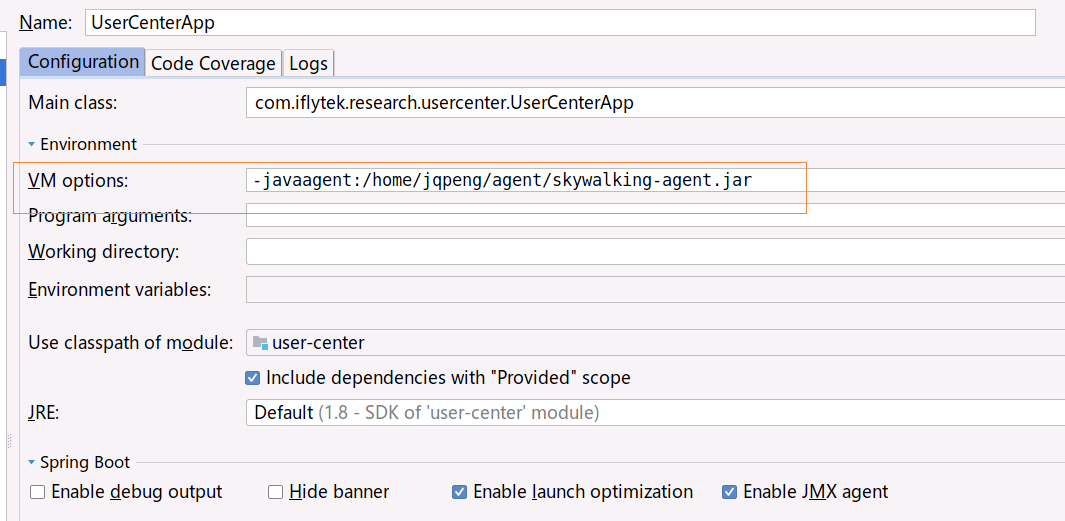
在IDEA里调试程序怎么办?

enter description here

增加VM参数即可。

agent探针配置,简单修改下agent.application_code即可

# 当前的应用编码,最终会显示在webui上。
# 建议一个应用的多个实例,使用有相同的application_code。请使用英文
agent.application_code=Your_ApplicationName

# 每三秒采样的Trace数量
# 默认为负数,代表在保证不超过内存Buffer区的前提下,采集所有的Trace
# agent.sample_n_per_3_secs=-1

# 设置需要忽略的请求地址
# 默认配置如下
# agent.ignore_suffix=.jpg,.jpeg,.js,.css,.png,.bmp,.gif,.ico,.mp3,.mp4,.html,.svg

# 探针调试开关,如果设置为true,探针会将所有操作字节码的类输出到/debugging目录下
# skywalking团队可能在调试,需要此文件
# agent.is_open_debugging_class = true

# 对应Collector的config/application.yml配置文件中 agent_server/jetty/port 配置内容
# 例如:
# 单节点配置:SERVERS="127.0.0.1:8080" 
# 集群配置:SERVERS="10.2.45.126:8080,10.2.45.127:7600" 
collector.servers=127.0.0.1:10800

# 日志文件名称前缀
logging.file_name=skywalking-agent.log

# 日志文件最大大小
# 如果超过此大小,则会生成新文件。
# 默认为300M
logging.max_file_size=314572800

# 日志级别,默认为DEBUG。
logging.level=DEBUG

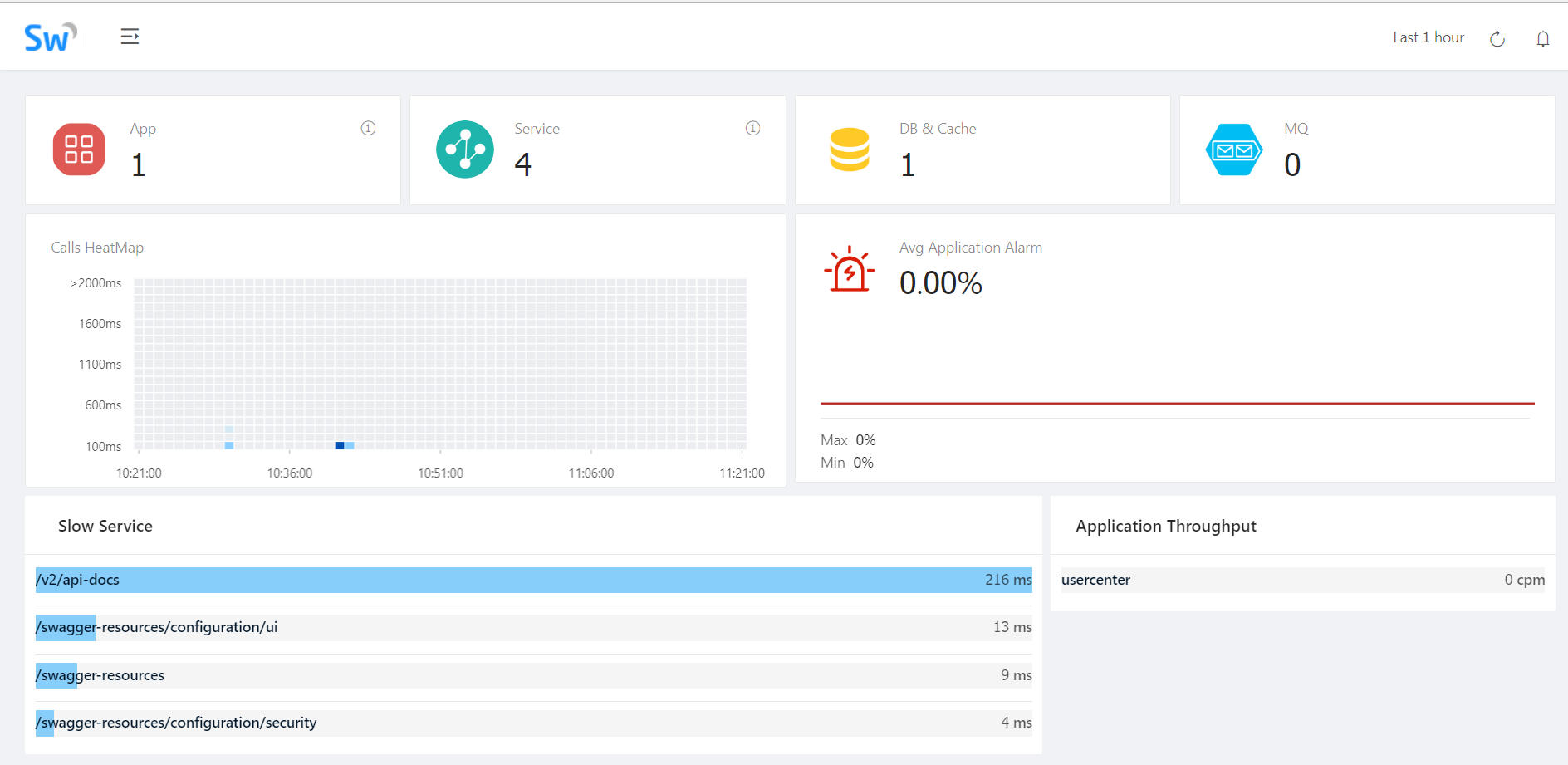
一切正常的话,稍后就可以在skywalking ui看到了。

enter description here

可以看到累出了slow service等信息,更多的细节慢慢挖掘吧。


作者:Jadepeng
出处:jqpeng的技术记事本–http://www.cnblogs.com/xiaoqi
您的支持是对博主最大的鼓励,感谢您的认真阅读。
本文版权归作者所有,欢迎转载,但未经作者同意必须保留此段声明,且在文章页面明显位置给出原文连接,否则保留追究法律责任的权利。